Showing posts with label MDX. Show all posts

Get Period N data in MDX...

In some scenarios, we may need to get Period N data including the current period.
As an example if we select the Year as 2017, we may need to get the values for 2017, 2016, 2015, .., (2017-(n-1)).

I was able to achieve it using the below MDX Query

WITH
SET [Set_PeriodRange] AS
{STRTOMEMBER(@Param_Period+".lag(N-1))" : STRTOMEMBER(@Param_Period)}

SELECT NON EMPTY{[Measures].[Sales]} ON COLUMNS,
NON EMPTY([Set_PeriodRange]) ON ROWS 
FROM [SalesCube]

Here what I did was I created a set for the what ever the required period range, using the lag function.
Then use that Set for the Row axis in the MDX.
@Param_Period is the parameter with the Year value.

The use of the created Set is that if you pass the parameter value based on a hierarchy, it will return the members for the current level of the hierarchy.
If the current level is Quarter, it will return the N number of Quarters.

Hope this will be helpful...


How to get the Last Month value of a Measure for a Period in MDX...

There was a requirement to show only the last month value for a particular measure, for the given period.
If the period is 2016, then it show the measure value of the 2016 Dec.
If the period is 2016 Q3, then the measure value has to be 2016 Sep.

I was able to achieve it, by creating a calculated measure using ClosingPeriod function.

Formula of the Calculated Measure is as below

(ClosingPeriod([DimDate].[Year-Quarter-Month].[Month], [DimDate].[Year-Quarter-Month].CurrentMember),[Measures].[Count])

You can test it using the below MDX Query as well.

WITH MEMBER [Measures].[LastMonthValue]
AS (ClosingPeriod([DimDate].[Year-Quarter-Month].[Month], [DimDate].[Year-Quarter-Month].CurrentMember),[Measures].[Count])

SELECT NON EMPTY { [Measures].[LastMonthValue] } ON COLUMNS
 FROM [CubeName]
WHERE STRTOSET(@Period,CONSTRAINED)

Hope this will be helpful...

Rank SSAS Cube data based on a filtered data set using MDX...

I explained how we can use MDX ranking in the below two posts.
MDX Rank and Advanced MDX Ranking.

But the queries given in those two posts will not work if you are filtering data using a dimension which is used for ranking and data is filtered using a sub cube. In such a case it will rank the data using the all the data set and filter it after that. If you filter it in the Where statement, Rank will work fine. But the issue is in this scenario you cannot use it, since the same dimension attribute is already used in the query.

To avoid this, we need to only use the filtered dimension members in the ranking calculation as well.
The sample query is as below. In that, ranking needs to be done for the selected stores and the used parameter is paramStores.

WITH
MEMBER [Measures].[RankSales] AS
RANK(([Store—Region_Store].CurrentMember,[Store—Region].CurrentMember,[Item—Department].CurrentMember),
ORDER(({STRTOSET(@paramStores)*[Store—Region].CurrentMember*[Item—Department].CurrentMember}),
[Measures].[Sales], BDESC))

SELECT {[Measures].[RankSales]} ON COLUMNS,
{STRTOSET(@paramStores)*[Item—Department].[Department].MEMBERS} ON ROWS
FROM  [Sales]

The output will be ranked only based on the available values in the paramStores parameter.


Adding additional dimension attribute value in MDX query...

Depending on the requirements, sometimes it is necessary to do some categorizations which does not included in the dimension data. In such scenarios we may have to add a dimension attribute which currently does not exists with the dimension data.
We can do it in the MDX query as below.

WITH
 MEMBER [DimBranch].[Branch].[Dummy] AS
   '0',
   SOLVE_ORDER = 0
 SELECT
 {[Measures].[CONTRIBUTION USECASE]} ON COLUMNS,
 NON EMPTY Union(
   [DimBranch].[Branch].Members,
   {[Branch].[Dummy]}) ON ROWS
 FROM [Sales]


You can set the measure value based on the required logic.

Exclude Unknown member from the TopCount in MDX...

While taking the Top or Bottom count using a MDX query or using a Named Set, we may need to exclude Unknown member. We can easily do it by using the FILTER function as below.

   1: TopCount
   2:     (
   3:     FILTER([Item].[Item].[Item].Members,[Item].[Item].CurrentMember.MEMBER_CAPTION<>'Unknown' ),
   4:     100,
   5:     [Measures].[Unit Price]
   6:     )

Same can be applied for the bottom count as well. Also we can filter any other member using the same approach.

Get the Top N records for a result set in MDX

In SQL Query we can easily get the Top N records for a result set. But we cannot use the same syntax in MDX.

Below query will show the Top 10 records of the result set.

   1: SELECT {[Measures].[Unit Price] } ON COLUMNS,NON EMPTY
   2: Head(NONEMPTY(CrossJoin([Item].[Item].[All] ,[Company].[Company].[All].Children) ),10) ON ROWS
   3: FROM [Cube]


How to show the All Member hierarchy value in a SSRS Filter...

For some filters we may need to select all the values at once. As an example if the SSRS parameter is a single valued one and user should be able to filter all the values if needed, then we need to provide All member value in the filter as well. We can achieve this easily by retrieving the all member value to the data set of the filter.

For an example we can write the query for the Branch data set, which loads the all the branches available in the [Sales-Branch] hierarchy as

   1: WITH MEMBER [Measures].[ParameterCaption] AS [Sales-Branch].CURRENTMEMBER.MEMBER_CAPTION
   2: MEMBER [Measures].[ParameterValue] AS [Sales-Branch].CURRENTMEMBER.UNIQUENAME MEMBER [Measures].[ParameterLevel] AS [Sales-Branch].CURRENTMEMBER.LEVEL.ORDINAL SELECT {[Measures].[ParameterCaption], [Measures].[ParameterValue], [Measures].[ParameterLevel]} ON COLUMNS , {[Sales-Branch].[All],[Sales-Branch].[Branch].MEMBERS} ON ROWS  FROM [Sales]

In that you can see the ParameterLevel for the top record as 0 and indicates it is the parent level. Therefore it is the all branches record and it is given by the [Sales-Branch].[All] in the mdx query.

Filtering Dimension Members having the same name in a MDX Query...

Sometimes different dimension members having different key values may have the same name. This kind of situations mainly occurs when we set a default value to those unknown dimension member values. As an example if we set the value as "Unknown" for the items in the sales records, which do not match our existing items, then the key value for those items in the cube will be different but the name value will be same.

But if we try to filter those "Unknown" member values using the query designer, it will only filter the selected members. Otherwise we have to select all the members having the name value as Unknown, to filter those. But if there are large number of members having the same name, then it will be difficult and not feasible to select all those.

We can filter those in the MDX query using INSTR function. The query will looks as below.

   1: SELECT NON EMPTY { [Measures].[Sales] } ON COLUMNS, NON EMPTY { (
   2: [Items—Items_Vendor_Item].[Item Name].ALLMEMBERS ) } ON ROWS FROM
   3: [SalesCube]
   4: WHERE FILTER([Items—Items_Category_Item].[Item].Members, INSTR([Items—Items_Category_Item].CurrentMember.Name,'Unknown')=0)

Since it is not allowed to use the same hierarchy more than once in the query, two dimension hierarchies are used which contains Items.

Passing two Multi-Value report parameters to a MDX Query...

When we write a MDX Query to filter data, we may want to filter the data set using two multi value report parameters. As an example we may want to get the Sales value for multiple Branches and for multiple Sales Persons.
In such kind of a situation the MDX Query will be as below.

SELECT NON EMPTY { [Measures].[Sales]} ON COLUMNS, NON EMPTY { ([DimBranch].[Branch].ALLMEMBERS * [DimEmployee].[SalesPerson].ALLMEMBERS) } ON ROWS FROM (SELECT ( STRTOSET ( '{" & Join(Parameters!Branch.Value,",") & "}', CONSTRAINED) ) ON COLUMNS FROM (SELECT ( STRTOSET ( '{" & Join(Parameters!SalesPerson.Value,",") & "}', CONSTRAINED) ) ON COLUMNS FROM [Sales]))

Branch and SalesPerson are the Multi-Valued report parameters and Sales is the Cube.

Also when you set the Value field for those parameters, set it as the field taken from considering UNIQUENAME. Otherwise if you have the parameter value as a string which has spaces, then it will gives an error since it only consider the first word before the space.
As an example if you send the branch value as Head Office, it only take the Head part. Therefore you have to pass the UNIQUENAME.

As an example you can take the data set for the Branch using below query.

WITH MEMBER [Measures].[ParameterCaption] AS [DimBranch].CURRENTMEMBER.MEMBER_CAPTION
MEMBER [Measures].[ParameterValue] AS [IDimBranch].CURRENTMEMBER.UNIQUENAME
SELECT {[Measures].[ParameterCaption], [Measures].[ParameterValue]} ON COLUMNS , [DimBranch].[Branch].ALLMEMBERS ON ROWS FROM [Sales]

Then you can use the ParameterCaption as the Label field and ParameterValue as the Value field for the Branch parameter.

Advanced MDX Ranking

There was a situation that I want to get the Rank value considering three dimension levels. In one of earlier post (MDX Rank post), I mentioned how to get the rank value for two dimension levels.
This post will shows the MDX query to get the rank value for three dimension levels.

Lets consider a scenario that we want to get the Rank value of a department considering the stores of a particular region. Below MDX query will give the required rank value.

WITH
MEMBER [Measures].[RankSales] AS
RANK(([Store—Region_Store].CurrentMember,[Store—Region].CurrentMember,[Item—Department].CurrentMember),
ORDER(({[Store—Region_Store].[Store].MEMBERS*[Store—Region].CurrentMember*[Item—
Department
].CurrentMember}),
[Measures].[Sales],
BDESC))

SELECT
{[Measures].[RankSales]} ON 0,
{[Store—Store].[Store].MEMBERS*[Item—
Department
].[
Department
].MEMBERS
} ON 1
FROM
[Sales]
where {[Store—Region].[All Store—Region].[Region1]}*{[Item—
Department_Sub
].[All Item—
Department_Sub
].[
Department1
]}

Likewise we can expand the query to any dimension levels. Hopes this will help you...

MDX Rank

Normally we use MDX Rank function to get the rank value considering just one dimension level. But I face an situation that Rank value needed to be taken considering two dimension levels. As an example needed to get the Rank of Sales value of stores, which related to a Region.
I was unable to find a direct solution and after doing some researches I was able to build the MDX query.
The query is given below.

WITH
MEMBER [Measures].[Rank] AS
RANK(([Store—Region].CurrentMember,[Store—Region_Store].CurrentMember),
ORDER(({[Store—Region_Store].[Store].MEMBERS*[Store—Region].CurrentMember}),
[Measures].[Sales],
BDESC))
SELECT
{[Measures].[Rank], [Measures].[Sales]} ON 0,
{[Store—Region_Store].[Store].MEMBERS} ON 1
FROM
[Sales]
where {[Store—Region].[All Store—Region].[Region1]}

If we give the region value as Region1, then what this query does is it rank only the stores which are related to the Region1 region. If the Region1 region contains 5 stores, the highest rank value you will get is 5.
Hope this will help for you as well...

Adding two Filter conditions in MDX WHERE statement

I wanted to add two conditions which contains different dimensionality in MDX WHERE statement. After trying several syntax I was able to find the way.

SELECT {[Measures].[Sales]} ON ROWS, {[Store—Store].[Store].ALLMEMBERS} ON ROWS
FROM [SalesCube] WHERE {[Customer].[All Customer].[CustomerName]} * {[Store—Region_Store].[All Store—Region_Store].[RegionName]}

If you entered the WHERE statement incorrectly, you will get an error message as
The function expects a tuple set expression for the 1 argument. A string or numeric expression was used.

MDX to get the parent level summation for a Measure with LastNonEmpty as aggregation

I faced an situation recently related to Inventory Calculations. In that we keep average inventory value in the Item level. It's parent level is category level. Aggregate function for average inventory measure is LastNonEmpty. In the report we have to show the summation of average inventory measure group by category level.
But the issue is if we take only the category dimension hierarchy and the average inventory measure, the value is incorrect. Because the aggregate function of the average inventory measure is LastNonEmpty, not the Sum.
We can resolve that issue by just adding the Item dimension hierarchy to the report data set and show the summation of average inventory measure value in the report using expressions.
But this will increase the report execution time if there are large number of items exist in the cube. Therefore in such situation report will take more time to load.

The best solution is add a calculated member to the cube which stores the summed value of items relevant to the category.
Just add a calculated member and add the Expression as

Sum(([Item—Category].currentmember.children), [Measures].[AverageInventory])

In this [Item—Category] is the hierarchy in the cube.

This resolves the issue with high report performance.

Two sets defined in the function have different dimensionality

When I tried to write a custom MDX query to retrieve Cube data, I got an Error message saying "Two sets defined in the function have different dimensionality".

The reason was we have to keep the same order of the Measures and Dimensions in the tuples, otherwise we will get the above error message

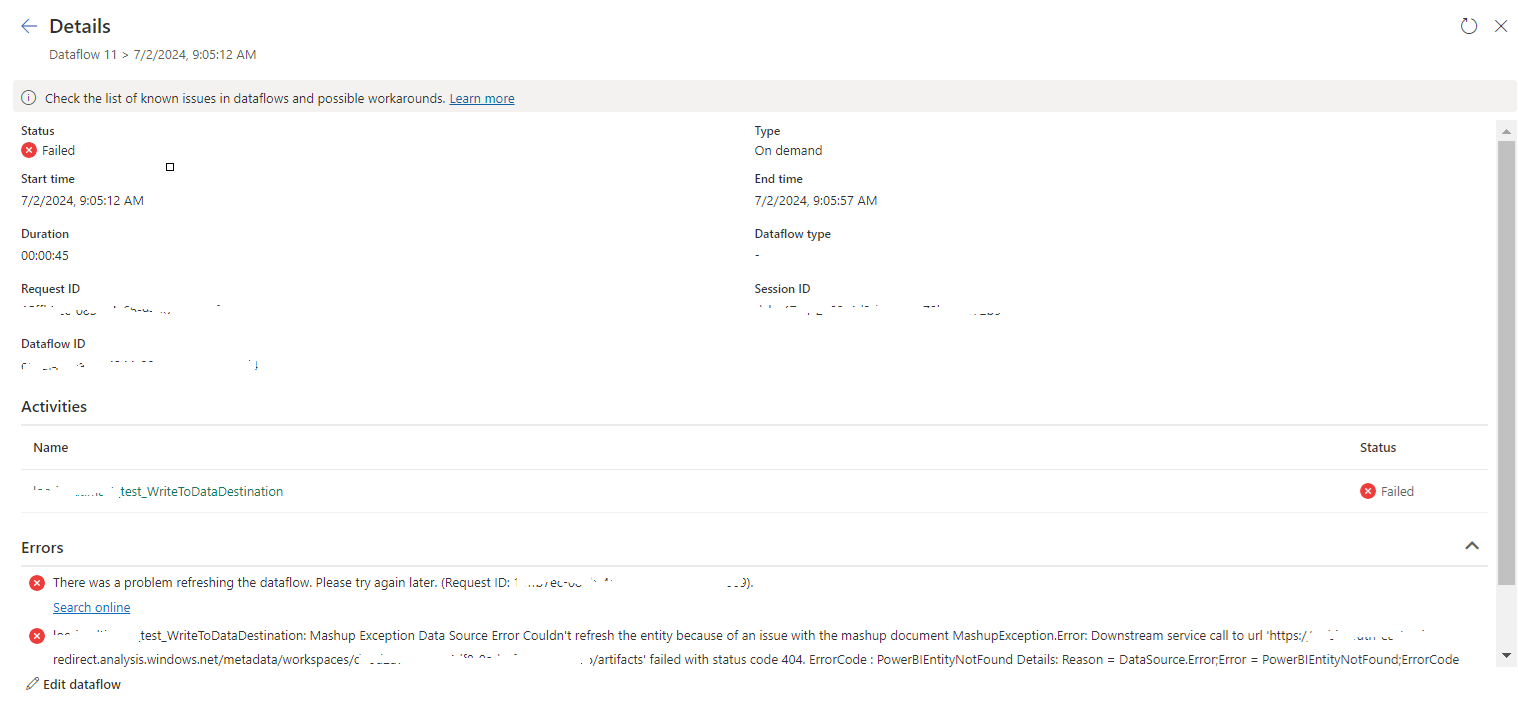
tablename_WriteToDataDestination: Mashup Exception Data Source Error Couldn't refresh the entity...

 Once a Dataflow is created and published on Fabric, got the below error while refreshing the Dataflow. tablename_ WriteToDataDestination: M...