Showing posts with label Business Intelligence. Show all posts

SSIS Script Component to Trim data in all the columns...

There are situations that we may have large number of input columns and we may need to Trim the data in those. Normally we can use Derived Column component to get done this, but in this scenario it is very difficult due to the large number of columns.
In such scenario it is easy to use Script Component and it can be configured to trim data for any number of input columns.

Solution is as below.


We can have a Script Component to trim data and there are some steps to follow.
We need to select on the required input columns and change the Usage Type of those columns to ReadWrite as below image.


Then click on Edit Script and follow the below steps to add the required code in C#
Add the using System.Reflection; namespace
Then modify the Input0_ProcessInputRow method as below
 public override void Input0_ProcessInputRow(Input0Buffer Row)
    {
        /*
         * Add your code here
         */
        foreach (PropertyInfo p in Row.GetType().GetProperties())
        {
         
           if (object.ReferenceEquals(p.PropertyType, typeof(string)))
            {
                if (p.GetValue(Row, null) != null)
                {
                    p.SetValue(Row, TrimData(p.GetValue(Row, null).ToString()), null);
                }
            }
        }
    }

The TrimData method is below
 public string TrimData(string ValueOfProperty)
    {
        // Uppercase the value
        ValueOfProperty = ValueOfProperty.TrimStart().TrimEnd();
        return ValueOfProperty;
    }


The complete code after those modifications is as below

#region Namespaces
using System;
using System.Data;
using Microsoft.SqlServer.Dts.Pipeline.Wrapper;
using Microsoft.SqlServer.Dts.Runtime.Wrapper;
using System.Reflection;
#endregion

///


/// This is the class to which to add your code.  Do not change the name, attributes, or parent
/// of this class.
///
[Microsoft.SqlServer.Dts.Pipeline.SSISScriptComponentEntryPointAttribute]
public class ScriptMain : UserComponent
{
    ///


    /// This method is called once, before rows begin to be processed in the data flow.
    ///
    /// You can remove this method if you don't need to do anything here.
    ///
    public override void PreExecute()
    {
        base.PreExecute();
        /*
         * Add your code here
         */
     
    }

    ///


    /// This method is called after all the rows have passed through this component.
    ///
    /// You can delete this method if you don't need to do anything here.
    ///
    public override void PostExecute()
    {
        base.PostExecute();
        /*
         * Add your code here
         */
    }

    ///


    /// This method is called once for every row that passes through the component from Input0.
    ///
    /// The row that is currently passing through the component
    public override void Input0_ProcessInputRow(Input0Buffer Row)
    {
        /*
         * Add your code here
         */
        foreach (PropertyInfo p in Row.GetType().GetProperties())
        {
         
            if (object.ReferenceEquals(p.PropertyType, typeof(string)))
            {
                if (p.GetValue(Row, null) != null)
                {
                    p.SetValue(Row, TrimData(p.GetValue(Row, null).ToString()), null);
                }
            }
        }
    }

    // New function that you can adjust to suit your needs
    public string TrimData(string ValueOfProperty)
    {
        // Uppercase the value
        ValueOfProperty = ValueOfProperty.TrimStart().TrimEnd();
        return ValueOfProperty;
    }
}

After that Build the code, save and close it. Then connect the Script Component with the Output source.

This can be used for any number of columns and it will loop though the available input columns and trim the data on those.

SSAS Single Role - Multiple Dimensions Issue...

In my previous post, I explained how to provide access using multiple roles for different dimensions.
Also I faced issues while providing access for multiple dimensions using a single role.

Let assume a scenario that we only need to provide the access for a Sales Manager, only for his Current Region. But Region of the Sales Manager may be changed and he should be able to see the relevant data for the Region for the period he assigned for that Region.

As I explained in my previous post, we need to maintain a mapping table for this requirement as well. Lets assume the name of the mapping table is SECURITY_MANAGER_REGION and the columns will be SalesManagerId, RegionId and MonthId. In this scenario I assumed sales manager is assigned for a particular region, at least for a period of Month.

Then we need to have the SECURITY_MANAGER_REGION table data in a fact table and can grant the access for the Region and Month dimensions based on it with in the same role.

But the issue is since those are two different dimension, security is applied separately and it is causing the issue.

To overcome that what I have done was, add a composite key using RegionId and MonthId  values to the SECURITY_MANAGER_REGION table.
Based on that table created a new dimension as DIM_SECURITY_MANAGER_REGION which uses the Key as the composite keys of RegionId and MonthId.

Then the Security is applied for the DIM_SECURITY_MANAGER_REGION dimension and the same dimension is linked with the measure groups using the RegionId and MonthId values.

That is it!

Multiple Roles - Different Dimensions in SSAS Security is not impossible...

We had a requirement to implement dynamic security in SSAS with multiple roles for different dimensions.
But due to the Additive design of SSAS security, it is causing issues and people think that is impossible.
But I found the below useful link, which mentioned some of the alternative approaches.
http://blogs.msdn.com/b/psssql/archive/2014/07/30/the-additive-design-of-ssas-role-security.aspx

Actually to have multiple roles for different dimensions, you need to consider below scenarios

  1. If you allow access in one role, you need to restrict that in the other roles.
  2. Need to consider the scenario that the user is not belongs to any of the roles and restrict access in that scenario as well.
  3. Also make sure that you put the tick for the Enable Visual Total check box in the security applied attribute.
Instead of the custom assembly approach mentioned in the above link, I was able to get done the same using a reference table and have that as a Non-Additive fact in the cube.

As an example let say we have two dimension as Customer and Region and we need to restrict the access for those based on the Sales Person. To provide the access for Customer data, there is a role as Role_Customer and to provide the access for Region data, there is a role as Role_Region.

To achieve that there are two mapping tables are maintained as SECURITY_REGION (Columns as SalesPersonId, RegionId) and SECURITY_CUSTOMER (Columns as SalesPersonId, RegionId) to keep the relevant mappings. Two measure groups are created based on those mapping tables as SECURITY REGION and SECURITY CUSTOMER to use the mapping tables in the cube.

In the SECURITY_REGION role, security is provided for the Region dimension using the below expression. You need provide expression for the Allowed member set of the RegionId attribute of the Region dimension, under the Dimension Data.

Exists
(
{[DIMREGION].[REGIONID].[REGIONID].Members},
STRTOSET("[LOGIN].[PERSON NAME].&["+username()+"]"),
"SECURITY REGION ")

LOGIN Dimension maintains the log in details of the users and it uses to capture the relevant logged user.

In the same way, security can be provided for the Customer dimension using SECURITY_CUSTOMER role, by using the below mdx expression for the CustomerId attribute in the Customer dimension.

Exists
(
{[DIMCUSTOMER].[CUSTOMERID].[CUSTOMERID].Members},
STRTOSET("[LOGIN].[PERSON NAME].&["+username()+"]"),
"SECURITY CUSTOMER ")

But if you only follow above steps, security will not be applied due to the Additive design of SSAS Security.
To avoid it we need to follow the second step mentioned in the top of the post and it can be done as below.

In the SECURITY_REGION role, we need make sure if the user is in the SECURITY_CUSTOMER role, then for the CustomerId attribute of the Customer dimension, we need to restrict all the members since the 
security will be applied from the SECURITY_CUSTOMER role. Otherwise we need to allow all the members.

We can achieve it by applying the below mdx expression for allowed member set of the CustomerID attribute of the Customer dimension in the SECURITY_REGION role.

IIF(Count(NonEmpty
(
{[DIMCUSTOMER].[CUSTOMERID].[CUSTOMERID].Members}*
STRTOSET("[LOGIN].[PERSON NAME].&["+username()+"]"),

[Measures].
[SECURITY CUSTOMER Count]))>0 OR 
(Count(NonEmpty
(
{[DIMCUSTOMER].[CUSTOMERID].[CUSTOMERID].Members}*
STRTOSET("[LOGIN].[PERSON NAME].&["+username()+"]"),

[Measures].
[SECURITY CUSTOMER Count]))=0 AND 
COUNT(NonEmpty
(
{[DIMREGION].[REGIONID].[REGIONID].Members}*

STRTOSET("[LOGIN].[PERSON NAME].&["+username()+"]"),
[Measures].[SECURITY REGION Count]))=0) ,
{},{[DIMCUSTOMER].[CUSTOMERID].[CUSTOMERID].Members})


We have to do the same thing for the RegionId attribute in the SECURITY_CUSTOMER  role.

Also make sure that you put the tick for the Enable Visual Total check box in all the security applied attributes.

These steps will allow you to provide security based on Multiple Roles for Different Dimensions.

Errors in the OLAP storage engine: A duplicate attribute key has been found when processing:

While processing a dimension, processing got failed and shown the below warning as well.
Errors in the OLAP storage engine: A duplicate attribute key has been found when processing:..

But when I checked the values of the mentioned attribute, there were no duplicate values. But the relevant column data type is INT and it has a value as NULL.
When I checked the dimension attribute key column properties, NullProcessing property is set to Automatic.
Actually this is causing the above error message since during the processing, NULL values are converted to 0 and we already have an attribute value as 0.
Same issue can happen for the string data types having blank value as well.

To fix this we can replace NULL values with the relevant value in the Data Source View of the Cube or replace it in the Data Warehouse using the ETL. Best way to do is to change it in the Data Warehouse.

Below link contains more details about this issue as well.


Error message when trying to open SQL Server Configuration Manager in SQL Server: "Cannot connect to WMI provider. You do not have permission or the server is unreachable"

We had an issue that SQL Server Analysis Server is not getting started and cannot connect to the SQL Server Configuration Manager as well. While trying to connect to the SQL Server Configuration Manager, got the below error message.

Cannot connect to WMI provider. You do not have permission or the server is unreachable. Note that you can only manage SQL Server 2005 and later servers with SQL Server Configuration Manager.

According to the below Microsoft support link, it says that the WMI Provider file is removed when the SQL Server is uninstalled.

https://support.microsoft.com/en-us/kb/956013

But in my case that is not the reason, since we did not do any uninstall. Possible reason could be that file is corrupted.

Before following the steps mentioned in the link, you can just try the below steps.


  • Stop the Analysis Service service
  • Restart the Windows Management Instrumentation service
  • Then try to restart the SQL Server Analysis Service service.
  • Check whether the SQL Server Analysis Service service is getting started, if not follow the steps mentioned in the link as below.


  • open a command prompt, type the following command, and then press ENTER:
  • mofcomp "%programfiles(x86)%\Microsoft SQL Server\number\Shared\sqlmgmproviderxpsp2up.mof"
  • Note For this command to succeed, the Sqlmgmproviderxpsp2up.mof file must be present in the %programfiles(x86)%\Microsoft SQL Server\number\Shared folder.

  • The value of number depends on the version of SQL Server:nnn
    Microsoft SQL Server 2012 - 110
    Microsoft SQL Server 2008 R2 - 100
    Microsoft SQL Server 2008 - 100
    Microsoft SQL Server 2005 - 90
  • Then restart the Windows Management Instrumentation service.
  • After that restart the SQL Server Analysis Service service as well.


This should fix both the issues mentioned above.

How to prevent first time cube access performance issue, after a cube refresh with Dynamic Security...

Recently we faced an issue that, after a cube refresh there is a performance issue while accessing the cube. This happens since the dynamic security was implemented.
This performance issue can be prevented by building cache for each user.

SSIS package was implemented to build the cache. In the package the approach used was to execute the create cache mdx command using each user id.
You can connect to the SSAS cube with different users by using the EffectiveUserName property in the Connection String.

The structure of the package is as shown below


Steps:

  • Create four variables as shown below. 


  • OLAP_ConnString is the value used as the connection string for SSAS cube. It includes the user name by using the EffectiveUserName property.
  • UserNames variable is used to get the list of users. 
  • Each user is assigned to UserName variable in the Foreach Loop Container.


  • Execute SQL Task us used with in the Foreach Loop Container use to create the cache using the MDX command. Since Effective User Name property is set using the UserName variable, the MDX command is executed for the particular user. That means the cache was created for that user.


After a cube refresh, we need to execute this package and it will prevent the first time access performance issue.


CDC Failed when changing the database or the CDC State table in SSIS Package...

Recently we faced that the SSIS packages got failed which use CDC, due to a validation issue when the data source is pointing to a different database or the CDC State table is pointing to a different one.

The solution is to set the Delay Validation property to True.
But I found that sometimes this is not enough in the package level and need to set it in the Data Flow and the set ValidateExternalMetaData to False in the CDC Source as well.

Hope this is helpful for you as well.

Set the Visibility of a Dimension Hierarchy in SSAS...

In some scenarios, you may need to set the visibility of a dimension hierarchy as hidden. Because that hierarchy may be used for some of the calculation and it is not good to show that to the user.
In such a case, it can be done using the below steps.

  • Open the Cube available in the BIDS.
  • Then select the Dimension Hierarchy available in the Cube Structure tab.
  • Right click on it and select Properties.
  • It will open the Properties window and set the Visible property value to False.
  • Then deploy and process the Cube. When the cube is browsed, that dimension hierarchy will not be visible.

Passing Variable value from Parent package to a Child Package in SSIS 2012

If we are executing a package from another package, we may want to pass variable values from the parent package to the child package. In SSIS 2008, we get done this using the Parent Variable in the Package Configurations. But in SSIS 2012 the approach is different.

To achieve this we have to use the Package Parameters in the child package.
In this post I am using the Pkg_Main as the parent package and the Pkg_Sub as the child package. I want to pass the ParamValue_Parent  variable value in the Pkg_Main package to the Pkg_Sub package.

For that I used the below steps

Go to the Pkg_Sub package (child package) and create the ParamValue_Sub package parameter as shown in the below image.


Then create the ParamValue_Parent variable in the Pkg_Main package and set the value accordingly.


Then add the Execute Package Task to the Pkg_Main package Control Flow and select the Pkg_Sub package to execute.

To pass the ParamValue_Parent  variable value in the Pkg_Main package to the ParamValue_Sub parameter in the Pkg_Sub package, go to the Parameter bindings in the Execute Task Editor window and click on Add. Then select the Child package parameter as ParamValue_Sub and the Binding parameter or variable as the User::ParamValue_Parent as shown in the below figure.


Click on Ok and that is it. After that when you execute the Pkg_Main package, the value available for the ParamValue_Parent will be passed to the ParamValue_Sub parameter in Pkg_Sub package.

Importance of the Surrogate Key in Data Warehouse Design

In Data Warehousing, Surrogate Key is a unique identification key in a dimension table which is independent from the source.
Normally it is an auto increment integer value.

The purpose to have a surrogate key in a dimension table is to makes the relationship between dimension tables and fact tables independent from the source.
Below example will explain the importance of the surrogate key clearly.

Let's say in a company they maintains the employee code as a fixed digit number and assume the number of digit is 4.
After few years, the company is growing and the number of employees get increased.
Due to that 4 digit employee code will not be sufficient and they decided to makes the number of digits in the employee code to 6.
In such scenario, employee code of the every employee will get changed.

But in the data warehouse, if we use the employee code as the key without using any surrogate key, then the employee is linked with facts using employee code.
Therefore if the employee code get changed, then the employee dimension and all the facts linked with employee dimension needs to be updated.
This is a very costly operation and we need to address such kind of situations while designing the data warehouse.

To avoid that we can use a Surrogate Key. Let's look at how the Surrogate Key avoid that kind of a situation.
Since the Primary Key in the employee dimension is the used surrogate key, then all the linked facts to the employee dimension is linked with that surrogate key.
Due to that even though the employee code gets changed, the only thing you have to do is just update the employee code in the employee dimension. That is it and no need to update any fact table.

Therefore as a best practice, in the dimension tables we use a Surrogate Key as the Primary Key of that table. 

Delete data using Partitions in SQL Server...

In a previous post I had explained how to partition SQL database tables. Actually we can use those partitions when we need to delete particular set of records from those large tables. Otherwise it will takes more time to delete those.
To create a stored procedure to truncate partition data, I reused a script in this link and applied some modification.
The added modifications are
  • Fixed the issue with joining the sys.partition_range_values for Right partitions
  • Added the non-clustered index
The below Stored Procedure uses to truncate partitions, created using the partition function from the previous post.
   1: IF EXISTS (

   2:        SELECT *

   3:        FROM   sys.objects

   4:        WHERE  OBJECT_ID = OBJECT_ID(N'[SP_TruncatePartition]')

   5:               AND TYPE IN (N'P', N'PC')

   6:    )

   7:     DROP PROCEDURE [SP_TruncatePartition]

   8: GO

   9:  

  10: CREATE PROCEDURE [SP_TruncatePartition]

  11:  @tableName VARCHAR(255)

  12:   ,

  13:  @partitionValueString VARCHAR(8)

  14:   ,@partitionGranualirity VARCHAR(1)

  15:  ,@schemaName VARCHAR(255) = 'dbo'

  16:  

  17: AS

  18: BEGIN

  19:  

  20:  DECLARE @partitionValue INT

  21:  

  22:   SET @partitionValue=CAST(@partitionValueString AS INT)

  23:  

  24:   IF(@partitionGranualirity='M')

  25:  BEGIN

  26:   SET @partitionValue=CAST((SUBSTRING(CAST(@partitionValue AS VARCHAR(8)),1,6)+'01') AS INT) 

  27:  END

  28:  

  29:  DECLARE @error                   INT,

  30:          @rowsCount               INT,

  31:          @errMsg                  VARCHAR(1024)

  32:  

  33:  DECLARE @partitionSchema         VARCHAR(255),

  34:          @partitionFunction       VARCHAR(255),

  35:          @partitionColumn         VARCHAR(255),

  36:          @tableStorageType        VARCHAR(16),

  37:          @partitionFunctionID     INT

  38:  

  39:  DECLARE @partitionFileGroupName  VARCHAR(255),

  40:          @databaseName            VARCHAR(255),

  41:          @partitionNumber         INT,

  42:          @cloneTableName          VARCHAR(255),

  43:          @compression             TINYINT,

  44:          @compressionQuery        VARCHAR(256)

  45:  

  46:  DECLARE @LogHeader               VARCHAR(23),

  47:          @Now                     DATETIME

  48:  

  49:  SELECT @tableName = LTRIM(RTRIM(ISNULL(@tableName, ''))),

  50:         @schemaName = LTRIM(RTRIM(ISNULL(@schemaName, ''))),

  51:         @databaseName = DB_NAME(),

  52:         @schemaName = LTRIM(RTRIM(@schemaName)),

  53:         @tableName = LTRIM(RTRIM(@tableName)),

  54:         @compressionQuery = ''

  55:  --

  56:  -- find the partition number for the partion value and other information for table partition 

  57:  SELECT @tableStorageType = i.type_desc,

  58:         @partitionSchema = ps.name,

  59:         @partitionFunction = pf.name,

  60:         @partitionFunctionID = pf.function_id

  61:         -- partition FOR RIGHT and boundary_id begins with id 1

  62:         ,

  63:         @partitionNumber = CASE 

  64:                                 WHEN pf.boundary_value_on_right = 1 THEN rv.boundary_id

  65:                                      + 1

  66:                                 ELSE rv.boundary_id

  67:                            END,

  68:         @partitionColumn = c.name,

  69:         @partitionFileGroupName = fg.name

  70:         -- compression can be 0: no compresson, 1: row level compression 2: page level compression

  71:         -- only apply to clustered index?

  72:         ,

  73:         @compression = CASE 

  74:                             WHEN i.index_id = 1 THEN p.data_compression

  75:                             ELSE 0

  76:                        END

  77:  FROM   sys.schemas s

  78:         INNER JOIN sys.tables t

  79:              ON  t.schema_id = s.schema_id

  80:                  -- check table storage type

  81:                  

  82:         INNER JOIN sys.indexes i

  83:              ON  (

  84:                      i.object_id = t.object_id 

  85:                      -- 0: heap

  86:                      -- 1: clusterd

  87:                      AND i.index_id IN (0, 1)

  88:                  )

  89:         INNER JOIN sys.partitions p

  90:              ON  p.object_id = i.object_id

  91:              AND p.index_id = i.index_id

  92:         INNER JOIN sys.index_columns ic

  93:              ON  (

  94:                      -- identify partioned column

  95:                      ic.partition_ordinal > 0

  96:                      AND ic.index_id = i.index_id

  97:                      AND ic.object_id = t.object_id

  98:                  )

  99:         INNER JOIN sys.columns c

 100:              ON  c.object_id = ic.object_id

 101:              AND c.column_id = ic.column_id

 102:         INNER JOIN sys.system_internals_allocation_units au

 103:              ON  p.partition_id = au.container_id

 104:         INNER JOIN sys.partition_schemes ps

 105:              ON  ps.data_space_id = i.data_space_id

 106:         INNER JOIN sys.partition_functions pf

 107:              ON  pf.function_id = ps.function_id

 108:         INNER JOIN sys.destination_data_spaces dds

 109:              ON  dds.partition_scheme_id = ps.data_space_id

 110:              AND dds.destination_id = p.partition_number

 111:         INNER JOIN sys.filegroups fg

 112:              ON  dds.data_space_id = fg.data_space_id

 113:         INNER JOIN sys.partition_range_values rv

 114:              ON  pf.function_id = rv.function_id

 115:              AND p.partition_number = (CASE 

 116:                                 WHEN pf.boundary_value_on_right = 1 THEN rv.boundary_id

 117:                                      + 1

 118:                                 ELSE rv.boundary_id

 119:                            END)

 120:  WHERE  -- only look for heap or clustered index 

 121:         i.index_id IN (0, 1)

 122:         AND s.name = @schemaName

 123:         AND t.name = @tableName

 124:             -- need exact match

 125:         AND CAST(rv.value AS INT) = @partitionValue

 126:  

 127:  SELECT @error = @@ERROR,

 128:         @rowsCount = @@ROWCOUNT,

 129:         @Now = GETDATE(),

 130:         @LogHeader = CONVERT(CHAR(23), @Now, 126)

 131:  

 132:  IF (@rowsCount <= 0)

 133:  BEGIN

 134:      PRINT @LogHeader + ' table ' + @tableName + ' on db ' + @databaseName + 

 135:      ' with schema ' + @schemaName

 136:      + ' is not partitioned or @partitionValue=' + CAST(@partitionValue AS VARCHAR(16))

 137:      + ' is not in exsiting partition range. will return.' 

 138:      RETURN 100

 139:  END

 140:  ELSE

 141:  BEGIN

 142:      PRINT @LogHeader + ' table ' + @tableName + ' on db ' + @databaseName + 

 143:      ' with schema '

 144:      + @schemaName + ' is partitioned: @partitionSchema=' + @partitionSchema

 145:      + ', @partitionFunction=' + @partitionFunction

 146:      + ', @partitionFunctionID=' + CAST(@partitionFunctionID AS VARCHAR(16))

 147:      + ', @partitionColumn=' + @partitionColumn

 148:      + ', @tableStorageType=' + @tableStorageType 

 149:      + ', @partitionValue=' + CAST(@partitionValue AS VARCHAR(16))

 150:      + ', @partitionNumber=' + CAST(@partitionNumber AS VARCHAR(16)) 

 151:      + ', @partitionFileGroupName=' + @partitionFileGroupName

 152:      + ', @compression=' + CAST(@compression AS VARCHAR(16))

 153:  END

 154:  --

 155:  -- create clone table on same file group, drop it if already exists

 156:  -- we don't need to take care of FK and no clustered for our case

 157:  -- No clustered index is not needed

 158:  -- taking care of columns and primary key

 159:  -- Ironically you could drop a table without droping its primary key!! suprise suprise

 160:  -- Now we know the primary key name, we can generate the drop statement

 161:  DECLARE @dropCloneTable            VARCHAR(MAX),

 162:          @createCloneTable          VARCHAR(MAX),

 163:          @primaryKeyName            VARCHAR(255),

 164:          @dropPrimaryKey            VARCHAR(MAX),

 165:          @primayKeyNamePlaceHolder  VARCHAR(255),

 166:          @hasPrimaryKey             TINYINT,

 167:          @switchPartition           VARCHAR(1024)

 168:  

 169:  SELECT -- A place holder for primary key which will be replace when the value is known

 170:         @primayKeyNamePlaceHolder = '$$PK_NAME$$',

 171:         @cloneTableName = @tableName + '_' + CAST(@partitionNumber AS VARCHAR(16)),

 172:         @dropCloneTable = 

 173:         'IF EXISTS (SELECT 1 FROM sys.objects WHERE object_id = OBJECT_ID(N' + 

 174:         '''' + @schemaName + '.' + @cloneTableName + '''' + 

 175:         ') AND type in (N' + '''' + 'U' + '''' + '))' + CHAR(13)

 176:         + 'BEGIN' + CHAR(13) + 'DROP TABLE ' + @schemaName + '.' + @cloneTableName

 177:         + CHAR(13) + 'END',

 178:         @dropPrimaryKey = 

 179:         'IF EXISTS (SELECT 1 FROM sys.indexes WHERE object_id = OBJECT_ID(N' + 

 180:         '''' + @schemaName + '.' + @cloneTableName + '''' + ') AND name = N' + 

 181:         '''' + @primayKeyNamePlaceHolder + '''' + ')' + CHAR(13)

 182:         + 'BEGIN' + CHAR(13) + 'ALTER TABLE ' + @schemaName + '.' + @cloneTableName

 183:         + ' DROP CONSTRAINT ' + @primayKeyNamePlaceHolder + CHAR(13) + 'END',

 184:         @switchPartition = 'ALTER TABLE ' + @schemaName + '.' + @tableName + 

 185:         ' SWITCH PARTITION ' + CAST(@partitionNumber AS VARCHAR(16)) + ' TO '

 186:         + @schemaName + '.' + @cloneTableName

 187:  

 188:  SELECT @hasPrimaryKey = CASE 

 189:                               WHEN tc.Constraint_Name IS NULL THEN 0

 190:                               ELSE 1

 191:                          END,

 192:         @primaryKeyName = CASE 

 193:                                WHEN @hasPrimaryKey = 1 THEN REPLACE(REPLACE(@CloneTableName, @schemaName, ''), '.', '')

 194:                                     + '_' + tc.Constraint_Name

 195:                                ELSE ''

 196:                           END,

 197:         @createCloneTable = 'CREATE TABLE ' + @schemaName + '.' + @CloneTableName

 198:         + '(' + o.list + ')'

 199:         + ' ON [' + @partitionFileGroupName + ']'

 200:         + CASE 

 201:                WHEN @hasPrimaryKey = 0 THEN ''

 202:                ELSE CHAR(13)

 203:                     + 'ALTER TABLE ' + @schemaName + '.' + @CloneTableName + 

 204:                     ' ADD CONSTRAINT ' + @primaryKeyName + ' PRIMARY KEY '

 205:                     + CASE 

 206:                            WHEN i.index_id IS NULL THEN 'NONCLUSTERED '

 207:                            ELSE 'CLUSTERED '

 208:                       END

 209:                     + ' (' + LEFT(j.List, LEN(j.List) -1) + ')'

 210:           END

 211:  FROM   sys.schemas s

 212:         INNER JOIN sys.objects so

 213:              ON  s.schema_id = so.schema_id

 214:         CROSS APPLY(

 215:      SELECT ' [' + column_name + '] '

 216:             -- deal with computed columns

 217:             + CASE 

 218:                    WHEN cc.is_computed = 1 THEN ' AS (' + cc.definition + ')'

 219:                         + CASE 

 220:                                WHEN cc.is_persisted = 1 THEN ' PERSISTED'

 221:                                ELSE ''

 222:                           END + ', '

 223:                    ELSE -- non computed columns case

 224:                         data_type +

 225:                         CASE data_type

 226:                              WHEN 'sql_variant' THEN ''

 227:                              WHEN 'text' THEN ''

 228:                              WHEN 'decimal' THEN '(' + CAST(numeric_precision AS VARCHAR) 

 229:                                   + ', ' + CAST(numeric_scale AS VARCHAR) + 

 230:                                   ')'

 231:                              ELSE COALESCE(

 232:                                       '(' + CASE 

 233:                                                  WHEN 

 234:                                                       character_maximum_length 

 235:                                                       = -1 THEN 'MAX'

 236:                                                  ELSE CAST(character_maximum_length AS VARCHAR)

 237:                                             END + ')',

 238:                                       ''

 239:                                   )

 240:                         END

 241:                         + ' '

 242:                         + CASE 

 243:                                WHEN EXISTS (

 244:                                         SELECT id

 245:                                         FROM   syscolumns

 246:                                         WHERE  OBJECT_NAME(id) = 

 247:                                                'TestTruncatePartition'

 248:                                                AND NAME = column_name

 249:                                                AND COLUMNPROPERTY(id, NAME, 'IsIdentity') = 

 250:                                                    1

 251:                                     ) THEN 'IDENTITY(' + CAST(IDENT_SEED('TestTruncatePartition') AS VARCHAR) 

 252:                                     + ',' + CAST(IDENT_INCR('TestTruncatePartition') AS VARCHAR) 

 253:                                     + ')'

 254:                                ELSE ''

 255:                           END

 256:                         + ' '

 257:                         + (CASE WHEN c.IS_NULLABLE = 'No' THEN 'NOT ' ELSE '' END) 

 258:                         + 'NULL '

 259:                         + CASE 

 260:                                WHEN c.COLUMN_DEFAULT IS NOT NULL THEN 

 261:                                     'DEFAULT ' + c.COLUMN_DEFAULT

 262:                                ELSE ''

 263:                           END + ', '

 264:               END

 265:      FROM   information_schema.columns c

 266:             LEFT JOIN sys.computed_columns cc

 267:                  ON  OBJECT_ID(c.TABLE_SCHEMA + '.' + c.TABLE_NAME) = cc.object_id

 268:                  AND c.COLUMN_NAME = cc.name

 269:      WHERE  c.table_name = so.name

 270:             AND c.TABLE_SCHEMA = @schemaName

 271:      ORDER BY

 272:             ordinal_position

 273:             FOR XML PATH('')

 274:  ) o(list)

 275:  LEFT JOIN information_schema.table_constraints tc

 276:              ON  tc.Table_name = so.Name

 277:              AND tc.Constraint_Type = 'PRIMARY KEY'

 278:              AND tc.TABLE_SCHEMA = @schemaName

 279:         CROSS APPLY(

 280:      SELECT '[' + Column_Name + '], '

 281:      FROM   information_schema.key_column_usage kcu

 282:      WHERE  kcu.Constraint_Name = tc.Constraint_Name

 283:             AND kcu.TABLE_SCHEMA = @schemaName

 284:      ORDER BY

 285:             ORDINAL_POSITION

 286:             FOR XML PATH('')

 287:  ) j(list)

 288:  -- find out if the primary key is clustered

 289:  LEFT JOIN sys.indexes i

 290:              ON  so.object_id = i.object_id

 291:                  -- index_id 1 means clustered

 292:                  -- constraint name is primary key name which is same as the index name

 293:              AND i.index_id = 1

 294:              AND tc.CONSTRAINT_NAME = i.name

 295:              AND tc.TABLE_SCHEMA = @schemaName

 296:  WHERE  s.name = @SchemaName

 297:         AND so.type = 'U'

 298:         AND so.name NOT IN ('dtproperties')

 299:         AND so.name = @TableName

 300:  

 301:  SELECT @error = @@ERROR,

 302:         @rowsCount = @@ROWCOUNT,

 303:         @Now = GETDATE(),

 304:         @LogHeader = CONVERT(CHAR(23), @Now, 126)

 305:  

 306:  PRINT @LogHeader + ' @hasPrimaryKey=' + CAST(@hasPrimaryKey AS VARCHAR(16))

 307:  IF (@hasPrimaryKey = 1)

 308:  BEGIN

 309:      SELECT @dropPrimaryKey = REPLACE(

 310:                 @dropPrimaryKey,

 311:                 @primayKeyNamePlaceHolder,

 312:                 @primaryKeyName

 313:             )

 314:  END

 315:  -- 1: Row compression

 316:  -- 2: Page compression

 317:  IF @compression = 1

 318:  BEGIN

 319:      SET @compressionQuery = 'ALTER TABLE ' + @schemaName + '.' + @cloneTableName 

 320:          + ' REBUILD PARTITION = ALL WITH (DATA_COMPRESSION = ROW)';

 321:  END

 322:  ELSE 

 323:  IF @compression = 2

 324:  BEGIN

 325:      SET @compressionQuery = 'ALTER TABLE ' + @schemaName + '.' + @cloneTableName 

 326:          + ' REBUILD PARTITION = ALL WITH (DATA_COMPRESSION = PAGE)';

 327:  END

 328:  --

 329:  -- taking care of clustered index

 330:  -- taking care of primary key is not enough since a primary key may not be clustered

 331:  -- so now we have to excludes clustered primary key index since they are already been taken care of

 332:  -- sample index create and drop statement

 333:  --

 334:  -- we may not need to drop the index? just in case

 335:  DECLARE @indexColums                    VARCHAR(256),

 336:          @indexName                      VARCHAR(256),

 337:          @indexUnique                    VARCHAR(8),

 338:          @hasNonPrimaryKeyClusterdIndex  TINYINT,

 339:          @createClusteredIndex           VARCHAR(8000),

 340:          @dropClusteredIndex             VARCHAR(8000)

 341:  

 342:  SELECT @indexColums = '(',

 343:         @indexUnique = '',

 344:         @indexName = '',

 345:         @hasNonPrimaryKeyClusterdIndex = 0,

 346:         @dropClusteredIndex = '',

 347:         @createClusteredIndex = ''

 348:  

 349:  SELECT -- whenever we have result from here, we do have clusterd index

 350:         @hasNonPrimaryKeyClusterdIndex = 1,

 351:         @indexColums = @indexColums + ic.columnList,

 352:         @indexName = @cloneTableName + '_' + i.name,

 353:         @indexUnique = CASE 

 354:                             WHEN i.is_unique = 0 THEN ''

 355:                             ELSE 'UNIQUE '

 356:                        END

 357:  FROM   sys.schemas s

 358:         INNER JOIN sys.tables t

 359:              ON  t.schema_id = s.schema_id

 360:         INNER JOIN sys.indexes i

 361:              ON  (

 362:                      i.object_id = t.object_id

 363:                      -- looking for clustered index ONLY

 364:                      AND i.index_id = 1

 365:                          -- ignore primary key, which is taken care of above already

 366:                      AND i.is_primary_key = 0

 367:                  )

 368:         CROSS APPLY(

 369:      SELECT c.name + CASE 

 370:                           WHEN ic.is_descending_key = 0 THEN ' ASC'

 371:                           ELSE ' DESC'

 372:                      END + ','

 373:      FROM   sys.index_columns ic

 374:             INNER JOIN sys.columns c

 375:                  ON  c.column_id = ic.column_id

 376:                  AND c.object_id = ic.object_id

 377:      WHERE  ic.index_id = i.index_id

 378:             AND ic.object_id = t.object_id

 379:      ORDER BY

 380:             ic.key_ordinal

 381:             FOR XML PATH('')

 382:  ) ic(columnList)

 383:  WHERE  s.name = @schemaName

 384:         AND t.name = @tableName

 385:  

 386:  

 387:  

 388:   -- Non Clustered Index

 389:  DECLARE @indexColumsNonClusterd                    VARCHAR(256),

 390:          @indexNameNonClusterd                      VARCHAR(256),

 391:          @indexUniqueNonClusterd                    VARCHAR(8),

 392:          @hasNonClusterdIndex  TINYINT,

 393:          @createNonClusterdIndex           VARCHAR(8000),

 394:          @dropNonClusterdIndex             VARCHAR(8000)

 395:  

 396:  SELECT @indexColumsNonClusterd = '(',

 397:         @indexUniqueNonClusterd = '',

 398:         @indexNameNonClusterd = '',

 399:         @hasNonClusterdIndex = 0,

 400:         @dropNonClusterdIndex = '',

 401:         @createNonClusterdIndex = ''

 402:  

 403:  SELECT -- whenever we have result from here, we do have clusterd index

 404:         @hasNonClusterdIndex = 1,

 405:         @indexColumsNonClusterd = @indexColumsNonClusterd + ic.columnList,

 406:         @indexNameNonClusterd = @cloneTableName + '_' + i.name,

 407:         @indexUniqueNonClusterd = CASE 

 408:                             WHEN i.is_unique = 0 THEN ''

 409:                             ELSE 'UNIQUE '

 410:                        END

 411:  FROM   sys.schemas s

 412:         INNER JOIN sys.tables t

 413:              ON  t.schema_id = s.schema_id

 414:         INNER JOIN sys.indexes i

 415:              ON  (

 416:                      i.object_id = t.object_id

 417:                      -- looking for clustered index ONLY

 418:                      AND i.index_id = 2

 419:                          -- ignore primary key, which is taken care of above already

 420:                     -- AND i.is_primary_key = 0

 421:                  )

 422:         CROSS APPLY(

 423:      SELECT c.name + CASE 

 424:                           WHEN ic.is_descending_key = 0 THEN ' ASC'

 425:                           ELSE ' DESC'

 426:                      END + ','

 427:      FROM   sys.index_columns ic

 428:             INNER JOIN sys.columns c

 429:                  ON  c.column_id = ic.column_id

 430:                  AND c.object_id = ic.object_id

 431:      WHERE  ic.index_id = i.index_id

 432:             AND ic.object_id = t.object_id

 433:      ORDER BY

 434:             ic.key_ordinal

 435:             FOR XML PATH('')

 436:  ) ic(columnList)

 437:  WHERE  s.name = @schemaName

 438:         AND t.name = @tableName

 439:  

 440:  

 441:  SELECT @error = @@ERROR,

 442:         @rowsCount = @@ROWCOUNT,

 443:         @Now = GETDATE(),

 444:         @LogHeader = CONVERT(CHAR(23), @Now, 126),

 445:         @hasNonPrimaryKeyClusterdIndex = ISNULL(@hasNonPrimaryKeyClusterdIndex, 0)

 446:  

 447:  PRINT @LogHeader + ' @hasNonPrimaryKeyClusterdIndex=' + CAST(@hasNonPrimaryKeyClusterdIndex AS VARCHAR(16))

 448:  IF (@hasNonPrimaryKeyClusterdIndex >= 1)

 449:  BEGIN

 450:      SELECT @dropClusteredIndex = 

 451:             'IF EXISTS (SELECT 1 FROM sys.indexes WHERE object_id = OBJECT_ID(N'

 452:             + '''' + @schemaName + '.' + @cloneTableName + '''' + 

 453:             ') AND name = N' + '''' + @indexName + '''' + ')'

 454:             + CHAR(13) + 'BEGIN' + CHAR(13)

 455:             + 'DROP INDEX ' + @indexName + ' ON ' + @schemaName + '.' + @cloneTableName

 456:             + CHAR(13) + 'END',

 457:             @createClusteredIndex = 'CREATE ' + @indexUnique + 

 458:             'CLUSTERED INDEX ' + @indexName + ' ON ' + @schemaName + '.' + @cloneTableName

 459:             + LEFT(@indexColums, LEN(@indexColums) -1) + ')'

 460:  END

 461:  

 462:   IF (@hasNonClusterdIndex >= 1)

 463:  BEGIN

 464:      SELECT @dropNonClusterdIndex = 

 465:             'IF EXISTS (SELECT 1 FROM sys.indexes WHERE object_id = OBJECT_ID(N'

 466:             + '''' + @schemaName + '.' + @cloneTableName + '''' + 

 467:             ') AND name = N' + '''' + @indexNameNonClusterd + '''' + ')'

 468:             + CHAR(13) + 'BEGIN' + CHAR(13)

 469:             + 'DROP INDEX ' + @indexNameNonClusterd + ' ON ' + @schemaName + '.' + @cloneTableName

 470:             + CHAR(13) + 'END',

 471:             @createNonClusterdIndex = 'CREATE ' + @indexUniqueNonClusterd + 

 472:             'NONCLUSTERED INDEX ' + @indexNameNonClusterd + ' ON ' + @schemaName + '.' + @cloneTableName

 473:             + LEFT(@indexColumsNonClusterd, LEN(@indexColumsNonClusterd) -1) + ')'

 474:  END

 475:  

 476:  SELECT @error = @@ERROR,

 477:         @rowsCount = @@ROWCOUNT,

 478:         @Now = GETDATE(),

 479:         @LogHeader = CONVERT(CHAR(23), @Now, 126)

 480:  

 481:  PRINT @LogHeader + 

 482:  ' (@dropPrimaryKey, @dropClusteredIndex, @dropCloneTable, @createCloneTable, @createClusteredIndex, @compressionQuery, @switchPartition, @dropPrimaryKey, @dropCloneTable)'

 483:  PRINT @dropPrimaryKey + CHAR(13) + @dropClusteredIndex + CHAR(13) + @dropCloneTable

 484:  + CHAR(13) + @createCloneTable + CHAR(13) + @createClusteredIndex + CHAR(13)

 485:  + @compressionQuery + CHAR(13) + @switchPartition + CHAR(13) + @dropPrimaryKey

 486:  + CHAR(13) + @dropCloneTable

 487:  DECLARE @returnCode INT

 488:  IF (@hasPrimaryKey = 1)

 489:  BEGIN

 490:      EXEC (@dropPrimaryKey)

 491:      SELECT @returnCode = 300,

 492:             @error = @@ERROR,

 493:             @rowsCount = @@ROWCOUNT,

 494:             @Now = GETDATE(),

 495:             @LogHeader = CONVERT(CHAR(23), @Now, 126),

 496:             @errMsg = @LogHeader + 

 497:             ' [1] failed to drop primary key for clone table. will return.'

 498:      

 499:      IF (@error <> 0)

 500:          GOTO ERROR

 501:  END

 502:  

 503:  IF (@hasNonPrimaryKeyClusterdIndex = 1)

 504:  BEGIN

 505:      EXEC (@dropClusteredIndex)

 506:      SELECT @returnCode = 310,

 507:             @error = @@ERROR,

 508:             @rowsCount = @@ROWCOUNT,

 509:             @Now = GETDATE(),

 510:             @LogHeader = CONVERT(CHAR(23), @Now, 126),

 511:             @errMsg = @LogHeader + 

 512:             ' [1] failed to drop clustered index for clone table. will return.'

 513:      

 514:      IF (@error <> 0)

 515:          GOTO ERROR

 516:  END

 517:  

 518:   IF (@hasNonClusterdIndex = 1)

 519:  BEGIN

 520:      EXEC (@dropNonClusteredIndex)

 521:      

 522:      IF (@error <> 0)

 523:          GOTO ERROR

 524:  END

 525:  

 526:  EXEC (@dropCloneTable)

 527:  SELECT @returnCode = 320,

 528:         @error = @@ERROR,

 529:         @rowsCount = @@ROWCOUNT,

 530:         @Now = GETDATE(),

 531:         @LogHeader = CONVERT(CHAR(23), @Now, 126),

 532:         @errMsg = @LogHeader + 

 533:         ' [1] failed to drop clone table. will return.'

 534:  

 535:  IF (@error <> 0)

 536:      GOTO ERROR

 537:  

 538:  EXEC (@createCloneTable)

 539:  SELECT @returnCode = 330,

 540:         @error = @@ERROR,

 541:         @rowsCount = @@ROWCOUNT,

 542:         @Now = GETDATE(),

 543:         @LogHeader = CONVERT(CHAR(23), @Now, 126),

 544:         @errMsg = @LogHeader + ' failed to create clone table. will return.'

 545:  

 546:  IF (@error <> 0)

 547:      GOTO ERROR

 548:  

 549:  IF (@hasNonPrimaryKeyClusterdIndex = 1)

 550:  BEGIN

 551:      EXEC (@createClusteredIndex)

 552:      SELECT @returnCode = 340,

 553:             @error = @@ERROR,

 554:             @rowsCount = @@ROWCOUNT,

 555:             @Now = GETDATE(),

 556:             @LogHeader = CONVERT(CHAR(23), @Now, 126),

 557:             @errMsg = @LogHeader + 

 558:             ' failed to create clustered index for clone table. will return.'

 559:      

 560:      IF (@error <> 0)

 561:          GOTO ERROR

 562:  END

 563:  

 564:   IF (@hasNonClusterdIndex = 1)

 565:  BEGIN

 566:      EXEC (@createNonClusteredIndex)

 567:     

 568:      

 569:      IF (@error <> 0)

 570:          GOTO ERROR

 571:  END

 572:  

 573:  IF (@compression IN (1, 2))

 574:  BEGIN

 575:      EXEC (@compressionQuery)

 576:      SELECT @returnCode = 350,

 577:             @error = @@ERROR,

 578:             @rowsCount = @@ROWCOUNT,

 579:             @Now = GETDATE(),

 580:             @LogHeader = CONVERT(CHAR(23), @Now, 126),

 581:             @errMsg = @LogHeader + 

 582:             ' failed to adjust clone table compressoin option. will return.'

 583:      

 584:      IF (@error <> 0)

 585:          GOTO ERROR

 586:  END

 587:  --

 588:  -- now do the partition switch to truncate data

 589:  EXEC (@switchPartition)

 590:  SELECT @returnCode = 360,

 591:         @error = @@ERROR,

 592:         @rowsCount = @@ROWCOUNT,

 593:         @Now = GETDATE(),

 594:         @LogHeader = CONVERT(CHAR(23), @Now, 126),

 595:         @errMsg = @LogHeader + 

 596:         ' failed to switch partition to clone table. will return.'

 597:  

 598:  IF (@error <> 0)

 599:      GOTO ERROR

 600:  --

 601:  -- now drop the coloum table again

 602:  IF (@hasPrimaryKey = 1)

 603:  BEGIN

 604:      EXEC (@dropPrimaryKey)

 605:      SELECT @returnCode = 370,

 606:             @error = @@ERROR,

 607:             @rowsCount = @@ROWCOUNT,

 608:             @Now = GETDATE(),

 609:             @LogHeader = CONVERT(CHAR(23), @Now, 126),

 610:             @errMsg = @LogHeader + 

 611:             ' [2] failed to drop primary key for clone table. will return.'

 612:      

 613:      IF (@error <> 0)

 614:          GOTO ERROR

 615:  END

 616:  

 617:  

 618:   EXEC (@dropCloneTable)

 619:  SELECT @returnCode = 390,

 620:         @error = @@ERROR,

 621:         @rowsCount = @@ROWCOUNT,

 622:         @Now = GETDATE(),

 623:         @LogHeader = CONVERT(CHAR(23), @Now, 126),

 624:         @errMsg = @LogHeader + 

 625:         ' [2] failed to drop clone table. will return.'

 626:  

 627:  IF (@error <> 0)

 628:      GOTO ERROR

 629:  

 630:  RETURN 0

 631:  ERROR:

 632:  PRINT @errMsg

 633:  RETURN @returnCode

 634: END


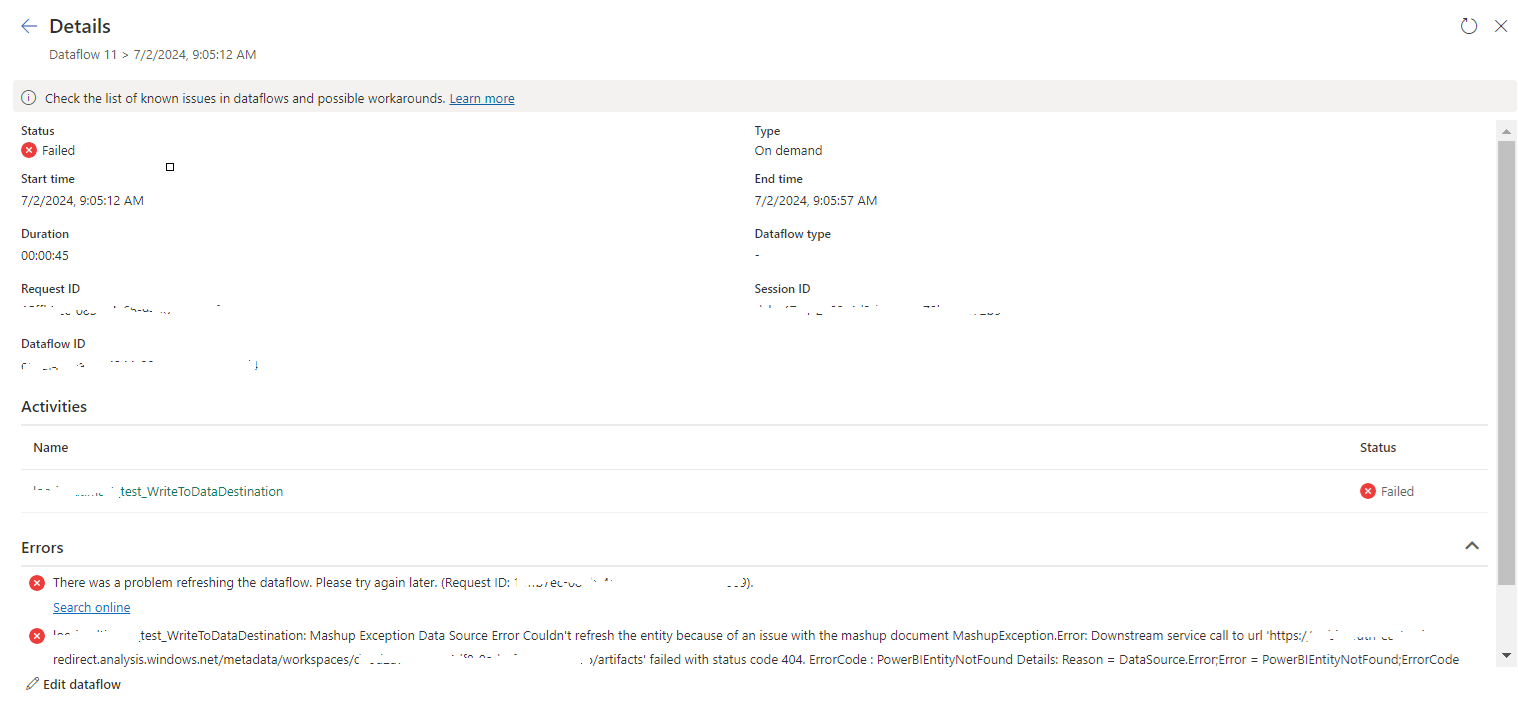
tablename_WriteToDataDestination: Mashup Exception Data Source Error Couldn't refresh the entity...

 Once a Dataflow is created and published on Fabric, got the below error while refreshing the Dataflow. tablename_ WriteToDataDestination: M...