Showing posts with label Data Warehousing. Show all posts

Data ingestion methods offered by Azure Synapse Analytics...

Azure Synapse Analytics offers several data ingestion methods and tools to facilitate the process of bringing data into your Synapse Analytics workspace. Here are some of the key data ingestion methods related to Azure Synapse Analytics:

  1. Azure Data Factory:
    • Definition: Azure Data Factory is a cloud-based ETL (Extract, Transform, Load) service that allows you to create, schedule, and automate data pipelines. It supports data movement and transformation from various sources to Azure Synapse Analytics.
    • Use Cases: Ingesting data from on-premises databases, cloud services, and various data stores into Synapse Analytics.
    • Integration: Azure Data Factory provides built-in connectors to Azure services and supports custom data connectors.
    • Advantages: Scalability, workflow orchestration, data transformation capabilities, and integration with Azure services.
  2. Azure Data Factory Data Flows:
    • Definition: Azure Data Factory Data Flows is a visual data transformation feature within Azure Data Factory. It allows you to build data transformation logic using a low-code/no-code approach, making it easier to prepare data for ingestion.
    • Use Cases: Data cleansing, enrichment, and transformation before ingesting into Synapse Analytics.
    • Integration: Seamlessly integrates with Azure Data Factory pipelines.
    • Advantages: Simplified data transformation, graphical interface, and integration with other Azure services.
  3. Azure Logic Apps:
    • Definition: Azure Logic Apps is a cloud-based workflow automation platform that enables you to create workflows to connect and integrate data and services from various sources, including external APIs and applications.
    • Use Cases: Triggering data ingestion based on events or conditions, integrating with external data sources.
    • Integration: Connects to a wide range of services and systems, including Synapse Analytics.
    • Advantages: Workflow automation, event-driven data ingestion, and support for external integrations.
  4. Azure Blob Storage and Azure Data Lake Storage Gen2:
    • Definition: Azure Blob Storage and Azure Data Lake Storage Gen2 are cloud storage solutions that can be used for storing raw data files. These storage solutions can serve as landing zones for data before processing and ingestion into Synapse Analytics.
    • Use Cases: Storing data files from various sources before ETL processing.
    • Integration: Native integration with Synapse Analytics.
    • Advantages: Scalable storage, cost-effectiveness, and compatibility with various data formats.
  5. PolyBase:
    • Definition: PolyBase is a feature within Azure Synapse Analytics that allows you to query and import data from external sources such as Azure Blob Storage, Azure Data Lake Storage, and on-premises SQL Server databases.
    • Use Cases: Querying and importing data from external data sources directly into Synapse Analytics.
    • Integration: Built-in feature of Synapse Analytics.
    • Advantages: Direct querying and importing of external data, reducing the need for complex ETL processes.
  6. Azure Data Share:
    • Definition: Azure Data Share is a service that allows you to share data between Azure services and with external organizations securely. You can use it to share data from your Synapse Analytics workspace with other Azure users or tenants.
    • Use Cases: Sharing data with collaborators, partners, or other Azure services.
    • Integration: Integration with Azure Synapse Analytics for data sharing.
    • Advantages: Secure data sharing, control over data access, and collaboration capabilities.

These data ingestion methods provide a range of options for bringing data into Azure Synapse Analytics, depending on your specific needs and the source of your data. You can choose the method that best fits your data integration requirements and workflow.

How to create an Azure Synapse Analytics workspace...

 Creating an Azure Synapse Analytics workspace involves several steps. Here's a step-by-step guide on how to create one:

1. Log in to Azure Portal:

  • Visit the Azure Portal.
  • Log in with your Azure account credentials.

2. Create a Resource Group (Optional):

  • You can choose to create a new resource group or use an existing one to organize your Synapse Analytics workspace and related resources.

3. Create a Synapse Analytics Workspace:

  • Click the "+ Create a resource" button in the Azure Portal.
  • In the search bar, type "Azure Synapse Analytics" and select it from the results.

4. Configure Synapse Analytics Workspace:

  • In the "Azure Synapse workspace" pane, click the "Create" button.

5. Basics:

  • Fill in the basic information for your workspace:
    • Workspace name: Choose a unique name for your workspace.
    • Subscription: Select your Azure subscription.
    • Resource group: Choose the resource group created in step 2 or create a new one.
    • Region: Select the Azure region where you want to deploy your Synapse Analytics workspace.

6. Security + networking:

  • Configure network settings, firewall rules, and virtual network integration based on your organization's requirements. You can choose to allow Azure services and resources to access this workspace and specify IP firewall rules.

7. Advanced:

  • Under the "Advanced" tab, you can configure settings related to system-managed private endpoints, Power BI integration, and private endpoint connections.

8. Review + Create:

  • Review the settings you've configured to ensure they are accurate.
  • Click the "Create" button to start the deployment process. Azure will validate your settings.

9. Deployment:

  • Azure will begin deploying your Synapse Analytics workspace. This process may take several minutes to complete.

10. Access Your Workspace: Once the deployment is successful, you can access your Azure Synapse Analytics workspace using the Azure Portal or other tools like Azure Synapse Studio. You'll need to configure authentication and access permissions as per your organization's policies.

11. Additional Configuration (Optional): You can further customize your Synapse Analytics workspace by adding data, configuring security, and setting up data pipelines as needed for your specific use case.

That's it! You've successfully created an Azure Synapse Analytics workspace. You can now start using it to build and manage your modern data warehouse, perform data analytics, and run data processing workloads.

Why Azure Synapse Analytics is a powerful choice for building a modern data warehouse?


Azure Synapse Analytics is a powerful choice for building a modern data warehouse for several compelling reasons:

  1. Unified Analytics Platform: Azure Synapse Analytics combines both data warehousing and big data analytics into a single unified platform. This means you can store, process, and analyze structured and unstructured data in one place, eliminating the need for separate systems.
  2. Scalability: It offers on-demand scalability, allowing you to scale compute resources up or down based on workload demands. This flexibility ensures optimal performance while managing costs efficiently.
  3. Integration with Azure Services: Azure Synapse Analytics seamlessly integrates with other Azure services, such as Azure Data Lake Storage, Azure Databricks, Azure Machine Learning, and Power BI. This integration simplifies data pipelines, analytics workflows, and data visualization.
  4. Data Ingestion and Transformation: Azure Synapse Analytics provides various tools for data ingestion and transformation, including Azure Data Factory, Azure Databricks, and Synapse Pipelines. These tools enable you to ingest data from a wide range of sources and perform ETL (Extract, Transform, Load) operations efficiently.
  5. Built-in Data Warehousing: It includes a built-in, dedicated SQL pool for data warehousing, making it easy to set up and manage your data warehouse. You can create data models and schema-on-read or schema-on-write, depending on your needs.
  6. Advanced Analytics and Machine Learning: Azure Synapse Analytics supports advanced analytics, machine learning, and AI capabilities. You can leverage Spark-based processing for big data analytics and integrate machine learning models into your data warehouse workflows.
  7. Security and Compliance: Azure Synapse Analytics offers robust security features, including Azure Active Directory (Azure AD) integration, encryption at rest and in transit, and role-based access control. It is compliant with various industry standards and regulations.
  8. Real-time Analytics: It supports real-time data processing and analytics, enabling you to make data-driven decisions based on the most up-to-date information.
  9. Serverless On-Demand Querying: With serverless SQL pools, you can run ad-hoc queries on your data without the need to provision and manage dedicated resources. This feature is cost-effective and convenient for occasional querying needs.
  10. Monitoring and Management: Azure Synapse Analytics provides comprehensive monitoring and management tools through Azure Monitor and Azure Synapse Studio, making it easy to monitor performance, troubleshoot issues, and optimize workloads.
  11. Cost Optimization: It separates compute and storage costs, allowing you to independently scale and manage resources, which can lead to significant cost savings. You only pay for the compute resources you use during query execution.

In summary, Azure Synapse Analytics offers a fully integrated, scalable, and flexible platform for building modern data warehouses. Its seamless integration with other Azure services, support for advanced analytics, security features, and cost-efficiency make it a powerful choice for organizations looking to harness the full potential of their data.

Concept of a Modern Data Warehouse...

 A modern data warehouse is a cutting-edge approach to data management and analytics that combines traditional data warehousing concepts with modern technologies and practices. It is designed to efficiently collect, store, process, and analyze vast amounts of data from various sources to support data-driven decision-making in real-time or near-real-time.

Key characteristics of a modern data warehouse include:

  1. Scalability: Modern data warehouses are designed to scale horizontally or vertically to handle the growing volume of data. They can seamlessly adapt to changing business needs.
  2. Integration: They integrate data from diverse sources, including structured and unstructured data, on-premises and cloud-based sources, IoT devices, and more.
  3. Data Processing: Modern data warehouses use advanced processing techniques, such as distributed computing, parallel processing, and in-memory analytics, to handle complex data transformations and queries quickly.
  4. Advanced Analytics: They support a wide range of analytics, including machine learning, artificial intelligence, and predictive analytics, allowing organizations to extract valuable insights from their data.
  5. Real-time Data: Many modern data warehouses offer real-time data processing capabilities, enabling businesses to make decisions based on the most up-to-date information.
  6. Cost Efficiency: They are designed to optimize cost by separating storage and compute, allowing users to pay only for the resources they consume.
  7. Security and Compliance: Modern data warehouses prioritize data security and compliance with features like encryption, role-based access control, and auditing.
  8. Self-Service BI: They often include self-service business intelligence tools that empower non-technical users to explore and visualize data independently.

Overall, a modern data warehouse is a flexible and powerful platform that empowers organizations to harness the full potential of their data for better decision-making and competitive advantage. It serves as the foundation for modern data-driven enterprises.

Importance of the Surrogate Key in Data Warehouse Design

In Data Warehousing, Surrogate Key is a unique identification key in a dimension table which is independent from the source.
Normally it is an auto increment integer value.

The purpose to have a surrogate key in a dimension table is to makes the relationship between dimension tables and fact tables independent from the source.
Below example will explain the importance of the surrogate key clearly.

Let's say in a company they maintains the employee code as a fixed digit number and assume the number of digit is 4.
After few years, the company is growing and the number of employees get increased.
Due to that 4 digit employee code will not be sufficient and they decided to makes the number of digits in the employee code to 6.
In such scenario, employee code of the every employee will get changed.

But in the data warehouse, if we use the employee code as the key without using any surrogate key, then the employee is linked with facts using employee code.
Therefore if the employee code get changed, then the employee dimension and all the facts linked with employee dimension needs to be updated.
This is a very costly operation and we need to address such kind of situations while designing the data warehouse.

To avoid that we can use a Surrogate Key. Let's look at how the Surrogate Key avoid that kind of a situation.
Since the Primary Key in the employee dimension is the used surrogate key, then all the linked facts to the employee dimension is linked with that surrogate key.
Due to that even though the employee code gets changed, the only thing you have to do is just update the employee code in the employee dimension. That is it and no need to update any fact table.

Therefore as a best practice, in the dimension tables we use a Surrogate Key as the Primary Key of that table. 

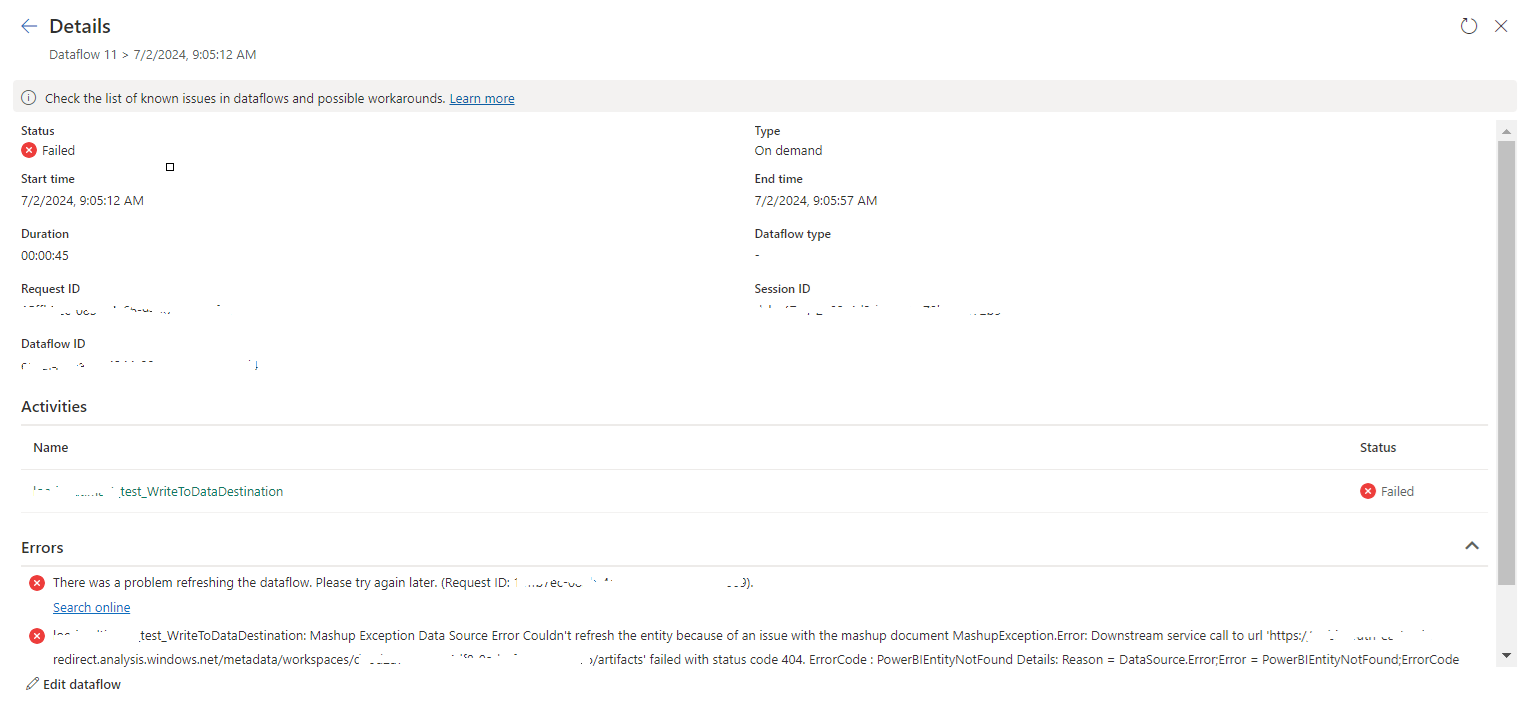
tablename_WriteToDataDestination: Mashup Exception Data Source Error Couldn't refresh the entity...

 Once a Dataflow is created and published on Fabric, got the below error while refreshing the Dataflow. tablename_ WriteToDataDestination: M...