When I tried to write a custom MDX query to retrieve Cube data, I got an Error message saying "Two sets defined in the function have different dimensionality".
The reason was we have to keep the same order of the Measures and Dimensions in the tuples, otherwise we will get the above error message


Securing SSIS Packages in the File System
One of the common concern we are facing is how to secure data and the design of the SSIS ETL packages deployed in the file system. Because if there are no security restrictions, users can open the SSIS packages and if they required do the enhancement for those. Also they can get some sensitive information's stored in those packages.
To secure SSIS packages, we can use package's ProtectionLevel property. What that property does is encrypts the package definition information in the relevant XML file.
We have to set this property while we are editing the package in the BIDS.
There are different protection level options that we can use according to our security requirement.
- DontSaveSensitive
- Sensitive information like connection passwords are not saved in the package - EncryptAllWithPassword
-Entire package is encrypted with a password that is set in the PackagePassword property - EncryptAllWithUserKey
-Entire package is encrypted based on the current user and computer - EncryptSensitiveWithPassword
-Sensitive information in the package is encrypted based on a package password, which is set in the PackagePassword property - EncryptSensitiveWithUserKey
-Sensitive information like connection passwords in the package are encrypted based on the current user and computer
There is another protection level option as ServerStorage, which can be used only when a package is stored in a SQL Server database
Faulting application OSQL.EXE...
For last couple of days I had a issue in SQL Server which is installed in Windows Server 2008 computer.
We are having a trigger to track the new inserts to a table and when it fires it executes few Stored Procedures as background processes using OLE Automation.
But sometimes even though that trigger was fired, those stored procedures did not executed.
When I checked the Windows Log in the Server Manager, I was able to find the below message
Faulting application OSQL.EXE, version 2009.100.1600.1, time stamp 0x4bb67996, faulting module kernel32.dll, version 6.0.6001.18000, time stamp 0x4791adec, exception code 0xc0000142, fault offset 0x00000000000b1188, process id 0x2274, application start time 0x01cc48354094868e.
I tried to find a solution by browsing the internet but couldn't find any solution.
After trying several workarounds I was able to find a solution to that issue.
The Solution is:
- Open the Server Manager.
- Expand Configuration section, then click on Services.
- Then restart the Windows Management Instrumentation service.
- After that restart the relevant SQL Server service.
I was able to solve the issue by restarting those two services and I hope this will helps to solve some other issues as well...
Changing Backup location for a SSAS Cube
When we try to get a backup of a SQL Server Analysis Service Cube, it only shows the default backup location and we are unable to change it.

But we can add a path to that default locations by adding that path to the AllowedBrowsingFolders server property. You can add multiple paths by using pipe symbol as the delimiter.
To add a new path to the AllowedBrowsingFolders server property, connect to the analysis server instance. Then right click on the analysis server instance and select Properties. Then you will get window. But if the Show Advanced (All) Properties check box is not selected, you will not see the AllowedBrowsingFolders property. If that check is not selected, then select it and you will get a window as below.
Then you can add paths as required by delimiting those using pipe symbol ("|" ).
Those paths should be local paths.
I cannot view the Object Explorer in SSMS...
When I tried to view object explorer in SQL Server Management Studio, I couldn't get it. I was able to get it by resetting window layout.
To do that select Reset Window Layout under Window menu.
To do that select Reset Window Layout under Window menu.
SET NOCOUNT ON
Below articles explains the importance of using SET NOCOUNT in SQL Stored Procedures and how it will improve the performance.
Decomposition Tree in PerformancePoint Sever 2010
Decompostion Tree is a new feature available in PerformancePoint 2010 and it is a very useful and smart feature for BI applications.
But there are few tricks need to be followed to have the decomposition tree in a scorecard.
But there are few tricks need to be followed to have the decomposition tree in a scorecard.
- You need to create KPIs from PerformancePoint. If you import KPIs from Analysis Sevices Cube, Decomposition Tree will not work.
- Need to provide values from a Measure. If it is provided from a MDX expression Decomposition Tree will not work.
- Therefore if you need to do some calculations for the KPI, create a Calculated Member which having the required calculation and set the Parent Hierarchy of the calculated member as Measures.
- Then you can use that calculated member as a measure to create the required KPI and the Decomposition Tree will be available for it.
- Calculation property for the Actual and the Target should be Data value.
- Also to enable the Decomposition Tree feature in the Scorecard, Silverlight need to be installed in the client machine.
- Also when I added those created KPIs by creating a blank scorecard from PerformancePoint, Decomposition Tree did not work. But when I created the scorecard by importing KPIs from analysis service and modified the KPIs as above, then the Decomposition Tree works fine.
Subscribe to:
Posts (Atom)
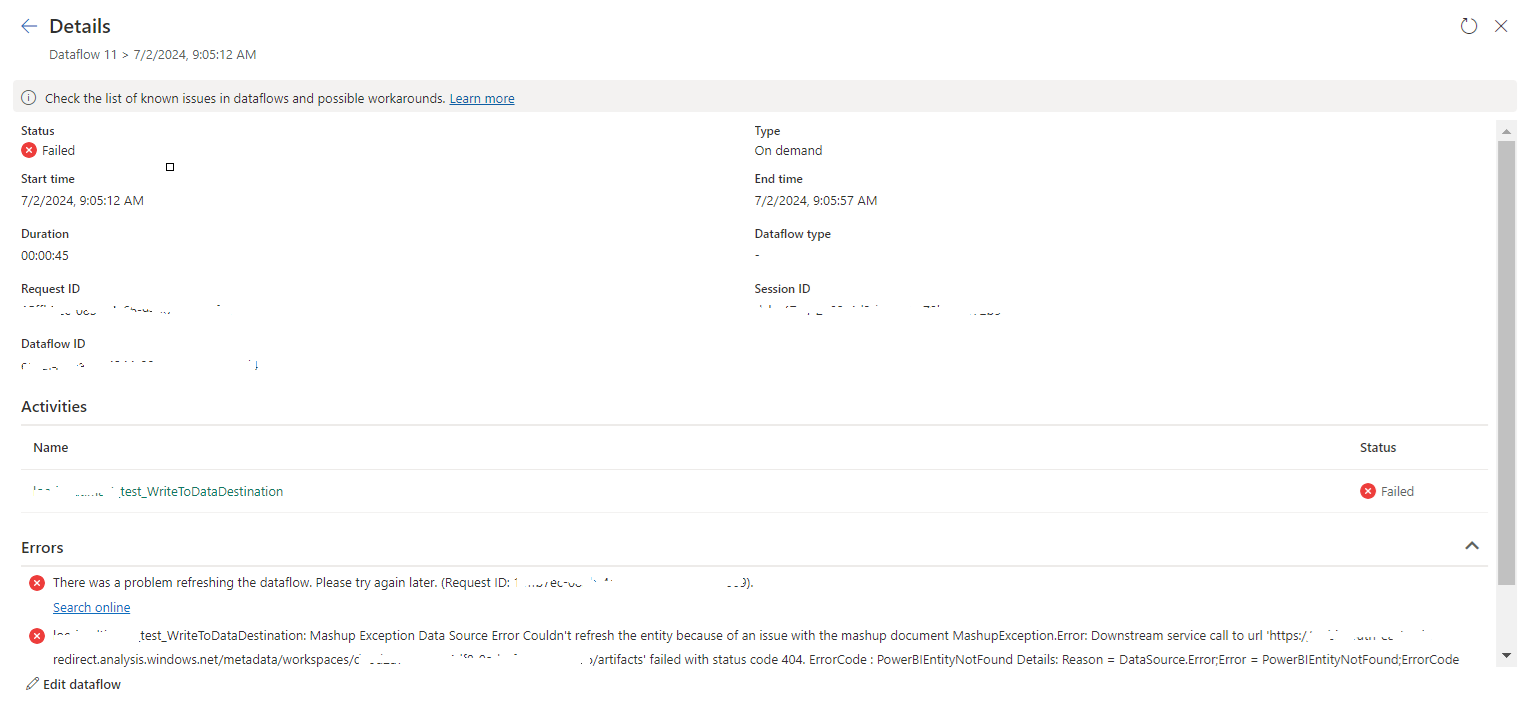
tablename_WriteToDataDestination: Mashup Exception Data Source Error Couldn't refresh the entity...
Once a Dataflow is created and published on Fabric, got the below error while refreshing the Dataflow. tablename_ WriteToDataDestination: M...
-
In SQL Report Subscription, you may want to send the report with the link and you can do it by selecting Include Link value. But some time...
-
In SQL Server Analysis Services Cube, there may be a situation where we need to combine two related fact tables. This kind of a situation ma...
-
 When I tried to connect to a SharePoint URL in dashboard designer options, it prompt a message saying "The URL is not available, does n...