The URL is not available, does not reference a SharePoint site, or you do not have permission to connect...

When I tried to connect to a SharePoint URL in dashboard designer options, it prompt a message saying "The URL is not available, does not reference a SharePoint site, or you do not have permission to connect"


When I checked the Event Log under Administrative Tools -> Event Viewer -> Windows Logs -> Application, message says that
"Cannot open database "WSS_Content_
GuidOrGivenName" requested by the login. The login failed.
Login failed for user 'domain\username'."

The reason is
that the the Service Account under which the PerformancePoint Service runs, does not have permissions for the SQL Server Content database of the SharePoint Web Application.

To fix this issue , add the domain user which uses to run PerformancePoint services as the database owner of the Content database of the web application (
WSS_Content_GuidOrGivenName).

After that you will not get that message...

Problem Encountered in SSIS Script Component...

While using SSIS Script Component, Data Flow Task was in Yellow color for few minutes and finally provided an exception from the Script Component as

at Microsoft.SqlServer.Dts.Runtime.Wrapper.IDTSVariableDispenser100.GetVariables(IDTSVariables100& ppVariables) at Microsoft.SqlServer.Dts.Pipeline.ScriptComponent.LockReadWriteVariables(String readWriteVariables) at Microsoft.SqlServer.Dts.Pipeline.ScriptComponentHost.PostExecute()

I found the reason for this issue at the below link
http://www.sqldev.org/sql-server-integration-services/memory-error-in-ssis-transformation-script-component-4422.shtml

According to that it explains the reason for the above exception and the solution as

"The read-write lock is "granted" in (or before) the PreExecute phase of the Data Flow, and only released AFTER the PostExecute phase. All components' PreExecutes are run, THEN the data flow runs, then ALL the components' PostExecutes are run. SSIS does not run the PostExecute of one component in the flow as soon as the last row moves through it. SSIS does not guarantee the execution order of PostExecute calls to the components in the data flow. In effect, it can't - because it can't guarantee that component A will be completely finished before component B starts, and adding any such guarantee would completely muck up any optimization/parallelism it could attempt.

Therefore - you can not have two Scripts - or even two Row Count transforms (or a combination of the two) in a single Data Flow thatwrite to the same variable. Because in each of those cases, SSIS "reserves" the variable from the time the flow starts until it ends.

In order to account for that, you'll need two (or more) variables - one for each "case" you want to report on."

Stored Procedure to Populate Date Dimension Data

In this post I created a stored procedure to insert data to Date Dimension tables.
I have used four tables to have the Date structure. They are DimYear, DimQuarter, DimMonth and DimDay.

Script used to generate Dimension tables is given below.

CREATE TABLE dbo.DimYear
(
YearKey smallint IDENTITY(1,1) NOT NULL,
[Year] smallint NOT NULL,
CONSTRAINT PK_DimYear PRIMARY KEY (YearKey)

)
GO


CREATE TABLE dbo.DimQuarter
(
QuarterKey smallint IDENTITY(1,1) NOT NULL,
YearKey smallint NOT NULL,
[Quarter] smallint NOT NULL,
QuarterName varchar(20) NOT NULL,
CONSTRAINT PK_DimQuarter PRIMARY KEY (QuarterKey),
CONSTRAINT FK_DimQuarter_DimYear FOREIGN KEY (YearKey)
REFERENCES DimYear (YearKey)

)
GO


CREATE TABLE dbo.DimMonth
(
MonthKey smallint IDENTITY(1,1) NOT NULL,
QuarterKey smallint NOT NULL,
MonthNumber smallint NOT NULL,
[MonthName] varchar(20)NOT NULL,
[Month] varchar(20) NOT NULL,
CONSTRAINT PK_DimMonth PRIMARY KEY (MonthKey),
CONSTRAINT FK_DimMonth_DimQuarter FOREIGN KEY (QuarterKey)
REFERENCES DimQuarter (QuarterKey)

)
GO


CREATE TABLE dbo.DimDay
(
DayKey smallint IDENTITY(1,1) NOT NULL,
MonthKey smallint NOT NULL,
[Day] smallint NOT NULL,
[DayName] varchar(20) NOT NULL,
WeekNoForMonth smallint NOT NULL,
WeekNoForYear smallint NOT NULL,
CONSTRAINT PK_DimDay PRIMARY KEY (DayKey),
CONSTRAINT FK_DimDay_DimMonth FOREIGN KEY (MonthKey)
REFERENCES DimMonth (MonthKey)
)
GO


A Stored Procedure was used to fill those dimension tables. Below I put the script of the Stored Procedure


IF OBJECT_ID('dbo.PopulateDateDimension') IS NOT NULL
DROP PROC dbo.PopulateDateDimension
GO

CREATE PROCEDURE dbo.PopulateDateDimension @Year smallint
AS
BEGIN

DECLARE @StartMonth tinyint --set the current month value
DECLARE @EndMonth tinyint --set the last month for a quarter
DECLARE @YearKey smallint --YearKey value in the DimYear table
DECLARE @Quarter smallint --Quarter value
DECLARE @LastQuarter smallint --Last Quarter value and it is equal to 4
DECLARE @QuarterKey smallint --QuarterKey value in the DimQuarter table
DECLARE @StartDay tinyint --current prossesing date
DECLARE @EndDay tinyint --last date for the month
DECLARE @MonthKey smallint --MonthKey value in the DimMonth table
DECLARE @MonthName varchar --Month Name in the YYYY-Month format
DECLARE @WeekNoForMonth smallint --Value of the processing week for the month
DECLARE @WeekNoForYear smallint --Value of the processing week for the year
DECLARE @WeekDayName varchar(20) --Weekday string (Sunday, Monday,...)

SET @StartMonth = 1
SET @EndMonth = 3
SET @Quarter = 1
SET @LastQuarter=4
SET @StartDay=1
SET @EndDay=31


BEGIN TRY
BEGIN TRANSACTION

IF NOT EXISTS (SELECT * FROM dbo.DimYear WHERE [Year] = @Year) --check whether the processing year is already filled or not
BEGIN

SET @WeekNoForYear=1 -- Starts the week value for the year

INSERT INTO dbo.DimYear (Year) VALUES (@Year)
SELECT @YearKey = SCOPE_IDENTITY() --Get the last inserted YearKey


IF NOT EXISTS(SELECT * FROM dbo.DimQuarter WHERE [Quarter] = @Quarter AND YearKey = @YearKey) --Check whether the quarter value for the given year is exist or not
BEGIN
WHILE @Quarter<=@LastQuarter --check the all the quarter values are inserted or not
BEGIN
INSERT INTO dbo.DimQuarter
(YearKey, Quarter, QuarterName)
VALUES
(@YearKey,@Quarter, CONVERT(varchar(4), @Year) + ' - ' + 'Q'+CONVERT(varchar(4),@Quarter))
SELECT @QuarterKey = SCOPE_IDENTITY() --Get the last inserter QuarterKey


WHILE @StartMonth <= @EndMonth --check all the months are inserted or not
BEGIN


IF NOT EXISTS(SELECT * FROM dbo.DimMonth WHERE MonthNumber = @StartMonth AND QuarterKey = @QuarterKey) --check the processing Month record is inserted or not
INSERT INTO dbo.DimMonth
(QuarterKey,[Month], MonthName, MonthNumber)
VALUES
(@QuarterKey, DATENAME(mm, CONVERT(datetime, CONVERT(varchar(2), @StartMonth) + '/1/2000', 101)),CONVERT(varchar(4), @Year) + ' - ' + DATENAME(mm, CONVERT(datetime, CONVERT(varchar(2), @StartMonth) + '/1/2000', 101)), @StartMonth)

SELECT @MonthKey=SCOPE_IDENTITY() --Get the last inserted MonthKey

SET @StartDay=1

--Set the number of days for the months

IF (@StartMonth=1 OR @StartMonth=3 OR @StartMonth=5 OR @StartMonth=7 OR @StartMonth=8 OR @StartMonth=10 OR @StartMonth=12)
SET @EndDay=31
ELSE IF (@StartMonth=4 OR @StartMonth=6 OR @StartMonth=9 OR @StartMonth=11)
SET @EndDay=30
ELSE
SET @EndDay=28

SET @WeekNoForMonth=1 --set the week no for the month
WHILE @StartDay<=@EndDay --Check all the days are inserted for the Month
BEGIN
IF NOT EXISTS (SELECT * FROM dbo.DimDay WHERE Day=@StartDay AND MonthKey=@StartMonth) --Check whether the processing Day is inserted or not


SET @WeekDayName=CONVERT(varchar(20),DATENAME(WEEKDAY,CONVERT(datetime,CONVERT(varchar(4),@Year)+'-'+CONVERT(varchar(4),@StartMonth)+'-'+CONVERT(varchar(4),@StartDay)))) --Get the processing Day string (Sunday, Monday,...)


INSERT INTO dbo.DimDay
(MonthKey,Day,DayName,WeekNoForMonth, WeekNoForYear)
VALUES
(@MonthKey,@StartDay,CONVERT(varchar(4), @Year)+'/'+CONVERT(varchar(2),@StartMonth)+'/'+CONVERT(varchar(2),@StartDay),@WeekNoForMonth,@WeekNoForYear)

SET @StartDay=@StartDay+1 --Increment the processing day value
IF (@WeekDayName='Sunday') --Check whether the week is completed or not (For this one consider the week is starting from Monday)
BEGIN
SET @WeekNoForMonth=@WeekNoForMonth+1 --If the week is completed increment both the WeekNo values
SET @WeekNoForYear=@WeekNoForYear+1
END


END


SET @StartMonth = @StartMonth + 1 --Increment the Month Value

END
SET @EndMonth=@EndMonth+3 --Increment the end month value for a Quarter
SET @Quarter=@Quarter+1 --Increment the Quarter value
END
END
END
COMMIT TRANSACTION
END TRY
BEGIN CATCH

DECLARE @ErrMsg varchar(1000)
IF @@TRANCOUNT > 0
BEGIN

SELECT @ErrMsg = ERROR_MESSAGE()
ROLLBACK TRANSACTION
PRINT @ErrMsg
END
END CATCH
END

Failed to create the configuration database in SharePoint 2010 Configuration Wizard

When I was trying to run the configuration wizard in SharePoint 2010, I got a error message saying
"Failed to create the configuration database
An exception of type System.InvalidOperationException was thrown. Additional exception information: This implementation is not part of the windows platform FIPS validated cryptographic algorithms"


The reason is in the system registry FIPS is enabled.
In the registry there are three keys which are related to FIPS.

1. HKLM\SYSTEM\ControlSet001\Control\LSA\FipsAlgorithm
2. HKLM\SYSTEM\ControlSet002\Control\LSA\FipsAlgorithm
3. HKLM\SYSTEM\CurrentControlSet\Control\LSA\FipsAlgorithm

Set the value for all the keys as "0" to disable FIPS.

Then re-run the configuring wizard after deleting the created tables related to SharePoint in the SQL Server Database.

It works for me and configuration was completed successfully.

Programmatically Set Audience to a SharePoint 2010 WebPart

To provide permission to a sharepoint web part for specific SharePoint Group, we have to use AudienceManager as shown below

SPWeb currentSite = SPContext.Current.Site.RootWeb;
SPSite spSite = currentSite.Site;

SPServiceContext sc = SPServiceContext.GetContext(spSite);

AudienceManager am = new AudienceManager(sc);

Microsoft.SharePoint.WebPartPages.SPLimitedWebPartManager mgr = null;
mgr = currentSite.GetLimitedWebPartManager("SitePages" + "/" + page, System.Web.UI.WebControls.WebParts.PersonalizationScope.Shared);
foreach (System.Web.UI.WebControls.WebParts.WebPart webPart in mgr.WebParts)
{
if (webPart.Title == "WebPartTitle")
{
//Get the Existing Audience for the Web Part
string audWebPart = webPart.AuthorizationFilter;
//If there is no Audience for the Web Part just add it
if (audWebPart == "")
{
webPart.AuthorizationFilter = ";;;;" + NewAudience;
}

//If already Audiences are exist for the Web Part then append new Audience
else
{
webPart.AuthorizationFilter = audWebPart + "," + NewAudience;
}

mgr.SaveChanges(webPart);
lblMessage.Text = "Succeeded...";
}
}


If we just set the value for AuthorizationFilter property, then the existing Audiences will be overwritten.
To avoid it first we have to check whether already audiences exists for that web part. If so we have to append it.

The SharePoint Server 2010 framework requires that three kinds of values be separated by a pair of semicolons (";;"). Multiple values for global audiences and SharePoint groups are delimited by commas, and multiple values for distribution lists are delimited by newline characters ("\n"). Therefore in the above example we used ";;;;" to provide valid string to the AuthorizationFilter property.

Retrieve SharePoint 2010 Permission Levels to a ASP.NET DropDownList

Below code shows how we can get the SharePoint permission levels and assign it to a ASP.NET DropDownList (drpPermissions)

drpPermissions.AppendDataBoundItems = true;

SPWeb currentSite = SPContext.Current.Site.RootWeb;


SPRoleDefinitionCollection permissionColl = currentSite.RoleDefinitions;

foreach (SPRoleDefinition permission in permissionColl)
{

drpPermissions.Items.Add(permission.Name.ToString());
drpPermissions.DataBind();
}

Issue with SharePoint Designer 2010...

While working with dashboard pages, a problem was identified.
First a dashboard page was published to a SharePoint 2010 site using PerformancePoint.
That page includes a SQL Server Report and a PerformancePoint Filter was applied for it. After publishing it to the SharePoint Site, the SharePoint page was opened using SharePoint Designer 2010.
Then some modifications for the layout of the page was done and saved it. But when I opened the page in the browser and tried to view the report, that PerformancePoint Filter was not applied for the report.
The issue is when we save the page using SharePoint Designer, the mapping between the report and the filter was lost.
To apply the filter we have to manually do the mapping.

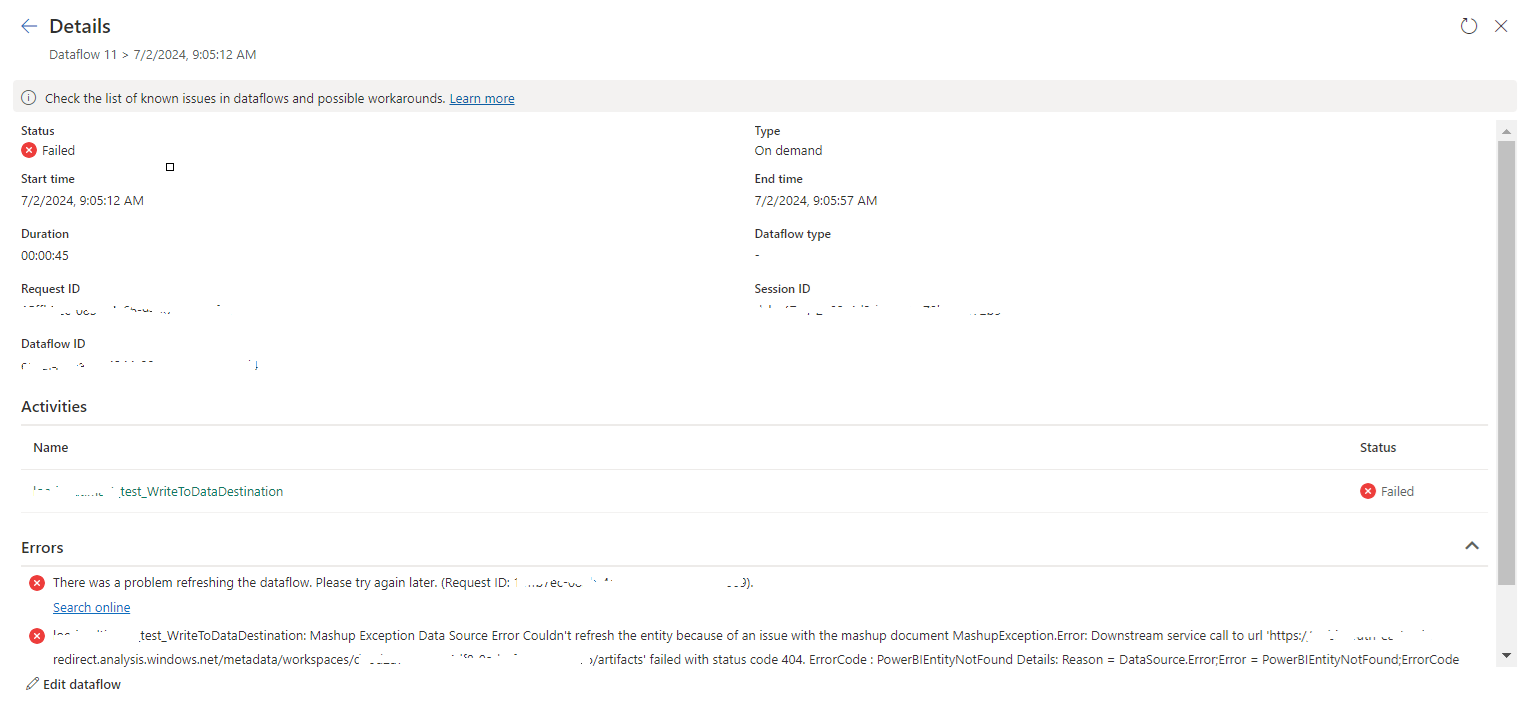
tablename_WriteToDataDestination: Mashup Exception Data Source Error Couldn't refresh the entity...

 Once a Dataflow is created and published on Fabric, got the below error while refreshing the Dataflow. tablename_ WriteToDataDestination: M...