Working with large Data Warehouses and Cubes...

In this post I include some of the best practices identified while working with large Data Warehouses and Cubes.
  • Use table partitioning for daily or monthly basis, depending on the data frequency.
  • Merge old partitions by considering the historical and changing data availability.
  • Design and implement table partitioning before loading the data. Otherwise you will be facing issues while trying to create the index for loaded data.
  • If you want to delete particular set of records, truncate the relevant partition. Because it will take more time if you try to delete it with large set of records.
  • Design and implement cube partitions.
  • Process the implemented partitions to load data, rather processing the whole measure group or cube. Otherwise it will utilize almost all the memory and CPU, if we try to load all at once.
  • Also use the Process Data option first and then use Process Index option. Sometimes it takes more time if you use the Process Full option.

Unable to process the cube after restoring to a different server...

There was an error while trying to process SSAS Cube, after restoring the cube to a different server in the same domain. The initial error shown related to credentials.
The following system error occurred:  Logon failure: unknown user name or bad password. 

Actually it is due to that the SQL Server user password is not saved. I provided the password and tried to process the cube again. But I got a different error message as below.

The following system error occurred:  The security database on the server does not have a computer account for this workstation trust relationship. 

There are different approaches mentioned in various sites to fix this issue. But I was able to easily fix this by changing the ImpersonateAccount to a domain user who have access to the Analysis Service. The user initially used was not a domain user.
Therefore if the same error is thrown, try to apply this fix and process the cube.

Hide multiple Measures in a Measure Group at once using Business Intelligence Development Studio...

Sometimes there will be situation that there are hundreds of measures in a measure group and we want to hide most of them except few measures.
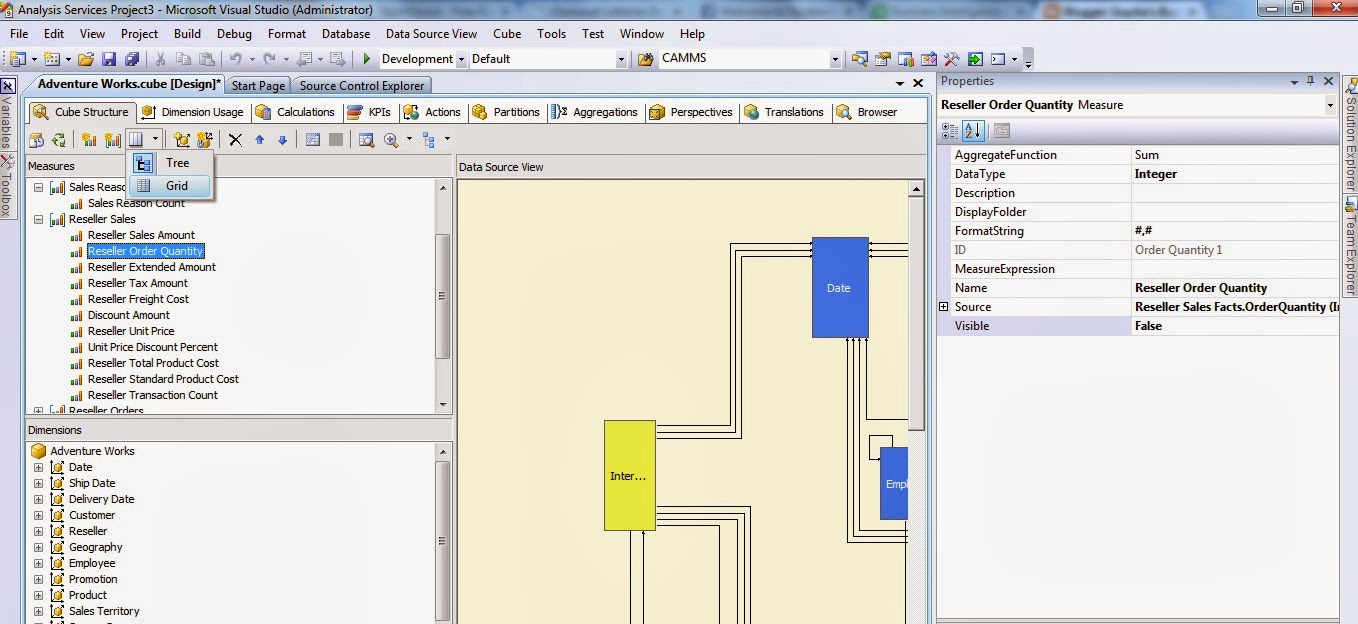
But normally in the BIDS, measures are list down as a tree and in that you have to set the visibility one by one as shown in the below figure. Because we cannot select all the measure by this view.


But for hundreds of measures this will not be practical and it will take more time and effort. 
We can easily do this by changing the measures listing to Grid as shown below.


Then we can select the multiple measures at once using the Shift or Ctrl keys and set the visibility as shown below.


Hope this will be helpful and save your time and effort.


Exclude Unknown member from the TopCount in MDX...

While taking the Top or Bottom count using a MDX query or using a Named Set, we may need to exclude Unknown member. We can easily do it by using the FILTER function as below.

   1: TopCount
   2:     (
   3:     FILTER([Item].[Item].[Item].Members,[Item].[Item].CurrentMember.MEMBER_CAPTION<>'Unknown' ),
   4:     100,
   5:     [Measures].[Unit Price]
   6:     )

Same can be applied for the bottom count as well. Also we can filter any other member using the same approach.

Could not load type 'Microsoft.AnalysisServices.SPAddin.ASLinkFilePage' in SharePoint 2013

While trying to create a BI Semantic Model Connection, I got an error as Could not load type 'Microsoft.AnalysisServices.SPAddin.ASLinkFilePage'.
The reason is that the PowerPivot Web Application has not been deployed to the SharePoint Web Application.
We can fix this error by following below steps.
  •  Go to the SharePoint 2013 Central Administration site.
  •  Go to the System Settings section.
  •  Click on Manage Farm Solutions under the Farm Management section.
  • Click on powerpivotwebapp.wsp
  • Click Deploy Solution at the top of the screen
  • In the Deploy To section select your web application from the drop down list and click Ok.

SSAS Cube is not shown in Excel and other client applications...

We faced a situation that the deployed and processed SSAS cube is not shown in Excel and other client applications, but it can be browsed through SQL Server Management Studio.
Actually the reason was somehow the Cube Visible property is set to False. Cube will be visible for Excel and other client applications only if this property is set to True.
But if the cube has large volume of data, it will take more time to deploy and process the cube after changing the visible property. Therefore it will not be practical and will waste time and resources.

Therefore in such scenario we can use XMLA Query to alter the cube visibility property value.
We can easily get the XMLA Query by right clicking the cube and selecting Script Cube as, then ALTER To as shown in the below image.


Then in the query window go the end of the Dimension section and you can see that the Visible property is set to false as shown in the below figure.


Change it to true and run the query. Then browse through the Excel or any other application uses to browse the cube and you will be able to browse it.

Numbering data into specific number of groups using NTILE function...

Sometimes we may need to cluster data into particular group according to the particular value.
As an example as per the SQL Rank... secenario, we may need to distribute rows to 10 groups depending on the AvgRate value. 
For that we can use NTILE function as we used the Rank function. The difference in the NTILE function is that we need to provide the number of groups we want.

Sample query is as below

   1: SELECT YearKey, SupplierKey, ItemKey, NTILE(5) OVER (PARTITION BY ItemKey, YearKey ORDER BY AvgRate ASC) AS GroupByAverageRate FROM FactPurchases GROUP BY YearKey, SupplierKey, ItemKey

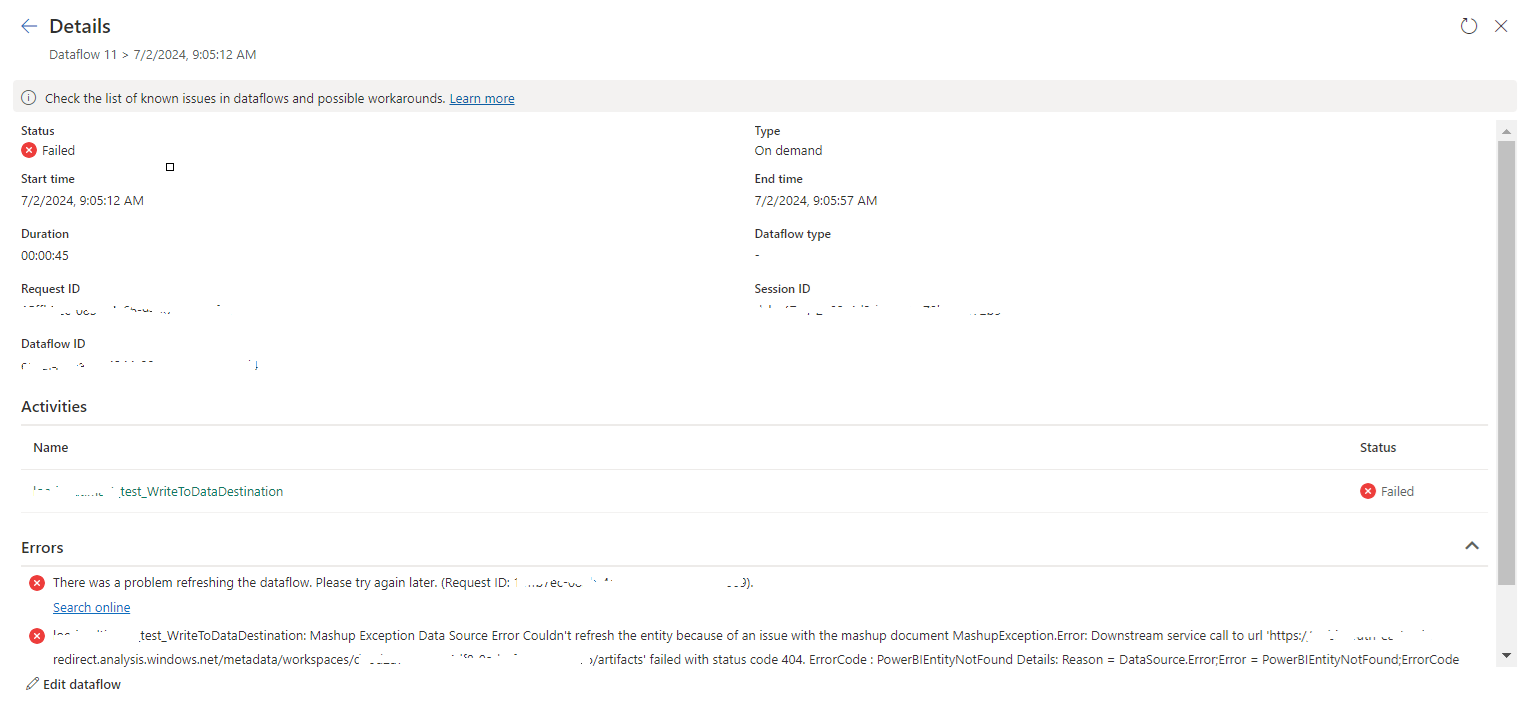
tablename_WriteToDataDestination: Mashup Exception Data Source Error Couldn't refresh the entity...

 Once a Dataflow is created and published on Fabric, got the below error while refreshing the Dataflow. tablename_ WriteToDataDestination: M...