Power Query formula to get the Today and Yesterday Sale values

Below formulas can be used to get only the Today and Yesterday Sale value in columns

Today Sale value:
TodaySale = if [Date]=  DateTime.Date(DateTime.LocalNow()) then [SaleValue] else null

Yesterday Sale value:
YesterdaySale = if [Date]=  Date.AddDays(DateTime.Date(DateTime.LocalNow()),-1) then [SaleValue] else null

Hope this will be helpful.

COVID-19 Dashboard


Please click here to view the dashboard created to track the COVID-19 situation.
Dashboard is created using Microsoft PowerBI and CoronaVirus REST API v1.0 is used as the data source.
Reference for CoronaVirus REST API v1.0: https://www.programmableweb.com/api/coronavirus-rest-api-v10

Split Comma Separated Values in a Column to Rows in SQL...

Lets assume a scenario where the Employee table contains information for all the Managers and Users. It will contains the relevant branch codes for each Employee.
Managers will have multiple branch codes and Users will have single branch code.
Sample data will be as shown below.

To achieve this STRING_SPLIT function can be used. This is available from SQL Server 2016 version.
Sample SQL Query is as below

SELECT EmpId, EmpName, value AS BranchCode FROM dbo.Employee CROSS APPLY STRING_SPLIT(BranchCode,',')

The query output is as below


Hope this will be helpful...


RDLC file is not found when the MVC application is deployed in Azure...

Once the MVC application is deployed in Azure, and when the user is trying to view a report (RDLC), it gives an error saying that the RDLC file is not found. But this is working fine in the local environment.

Actually this is related to the Build Action of the RDLC file.
To fix this issue, select the RDLC file in the Solution Explorer and go to Properties.


Change the "Build Action" value from "Embedded Resource" to "Content".


Once this is done, deploy the report again to Azure and the issue will be fixed.


SQL Database Email is not working...

I have configured Database Mail in SQL Server 2016.
But when I Send Test E-Mail, I did not receive any email.
Actually I have followed the same exact steps I used to configure it in a different server and all the things are fine including credentials.

Then I used the below query to check the status of it
SELECT * FROM msdb..sysmail_mailitems WHERE send_request_date > DATEADD(DAY, -1,GETDATE())

According to that sent_status=0. That means that request is new or not sent.
Then I find the DatabaseMail application file in the below path and double click on it.
\Program Files\Microsoft SQL Server\MSSQL13.MSSQLSERVER\MSSQL\Binn


 Then I got the below message


I checked the Features and .Net Framework 3.5 is not installed yet.


When it is installed, Database Mail is started to work fine.

Converting string value with "dd-MMM-yy hh.mm.ss.nnnnnn a" format to DateTime in SSIS

I had a requirement to convert a string value which contains a date time value with the format as "dd-MMM-yy hh.mm.ss.nnnnnn a" to DateTime.
I initially tried to convert it with the millisecond value, but it throws an error.
For my requirement I do not need the milliseconds, therefore I tried to convert it by removing the milliseconds part and it worked.

Below is the Expression used in the Derived Column component

ISNULL(DATA_VALUE) || LTRIM(RTRIM(DATA_VALUE)) == "" ? NULL(DT_DBTIMESTAMP) : (DT_DBTIMESTAMP)((DT_WSTR,10)((DT_DBDATE)SUBSTRING(DATA_VALUE,1,9)) + (DT_WSTR,1)" " + REPLACE(SUBSTRING(DATA_VALUE,27,2) == "AM" ? (DT_WSTR,12)SUBSTRING(DATA_VALUE,11,8) : (DT_WSTR,2)((DT_I4)SUBSTRING(DATA_VALUE,11,2) + 12) + (DT_WSTR,10)SUBSTRING(DATA_VALUE,13,6),".",":"))

Hope this will be helpful.

Power BI Schedule Refresh error...

There was an error thrown in PowerBI Schedule Refresh as

[0] -1055784932: Credentials are required to connect to the SQL source. (Source at xxxx;xxxxx.). The exception was raised by the IDbCommand interface.
[1] -1055784932: The command has been canceled.. The exception was raised by the IDbCommand interface.
[2] -1055784932: The command has been canceled.. The exception was raised by the IDbCommand interface.
[3] -1055784932: The command has been canceled.. The exception was raised by the IDbCommand interface.
[4] -1055784932: The command has been canceled.. The exception was raised by the IDbCommand interface.
[5] -1055784932: The command has been canceled.. The exception was raised by the IDbCommand interface.
[6] -1055784932: The command has been canceled.. The exception was raised by the IDbCommand interface.
[7] -1055784932: The command has been canceled.. The exception was raised by the IDbCommand interface.


I checked the credentials of the data source and everything is fine.
I referred the below link
https://community.powerbi.com/t5/Report-Server/Error-when-Refreshing-SQL-Data/td-p/317866/page/3

As mentioned in the above link,
"For each data source, check the name of the server and the database, it seems to be case sensitive when deployed to the server, but not when using the Power BI Desktop."

I had the same scenario and in my case it was with the database name.
I changed all the database names to exactly same name based on the case sensitivity and deployed the report.
After that schedule refresh is working fine.

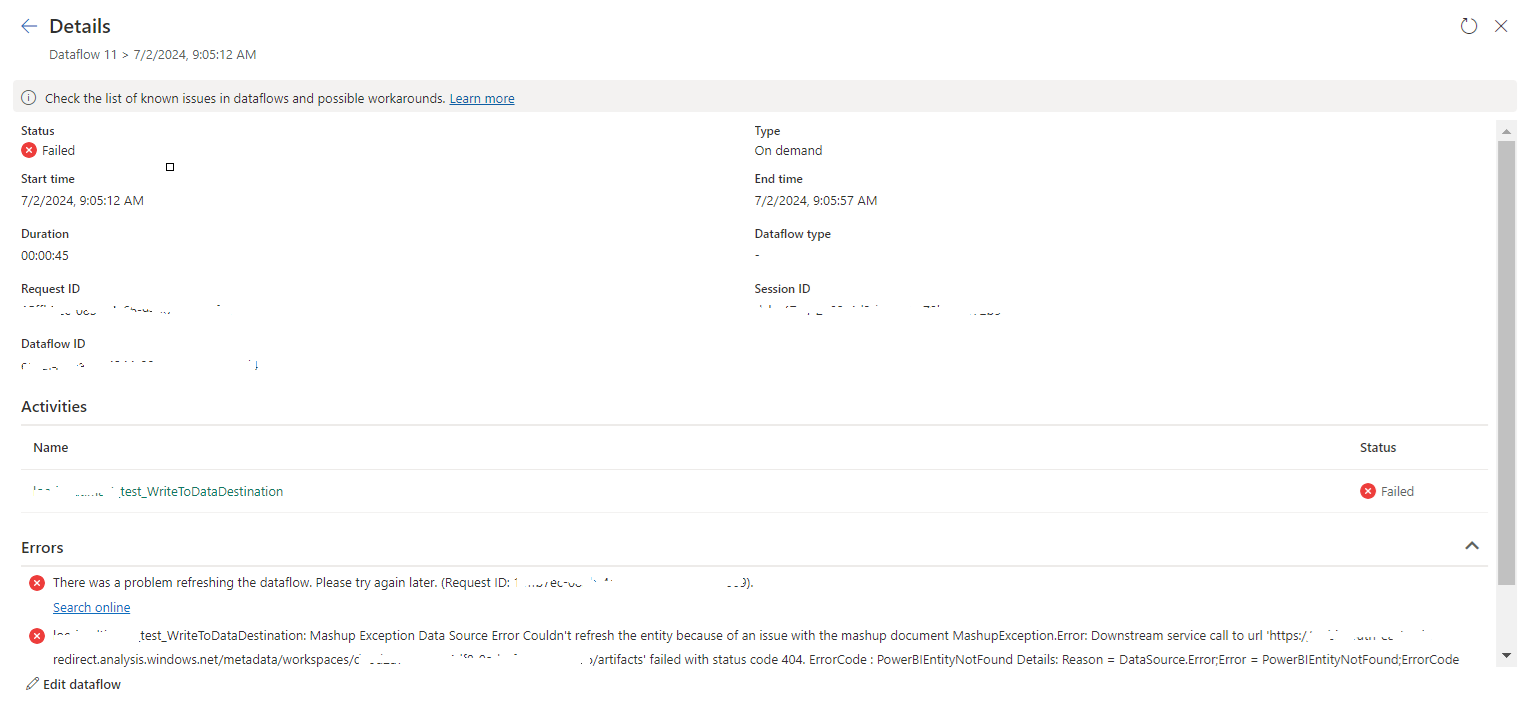
tablename_WriteToDataDestination: Mashup Exception Data Source Error Couldn't refresh the entity...

 Once a Dataflow is created and published on Fabric, got the below error while refreshing the Dataflow. tablename_ WriteToDataDestination: M...